TitleUrlCopy takedajs توسط
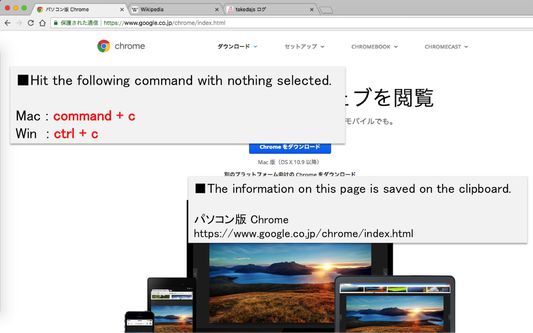
When you press command + c (mac) or or ctrl+c (win) with no character selected, save the site title and URL on the clipboard. 文字を選択していない状態でcommand+c (mac) or ctrl+c (win) を押下した時、サイトのタイトルとURLをクリップボードに保存します。
۳۰۱ کاربر۳۰۱ کاربر
فرادادهٔ افزونه
تصاویر صفحه
دربارهٔ این افزونه
When you press command+c (mac) or ctrl+c (win) with no character selected, save the site title and URL on the clipboard.
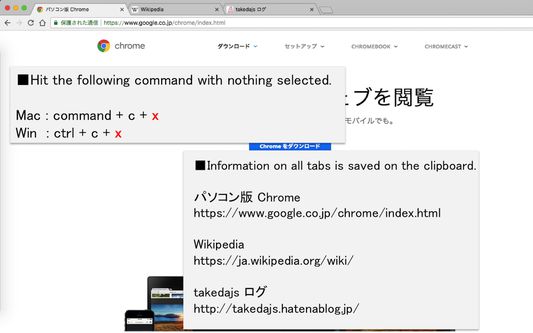
When you want to acquire all tabs: command+c+x (mac) or ctrl+c+x (win).
■option setting
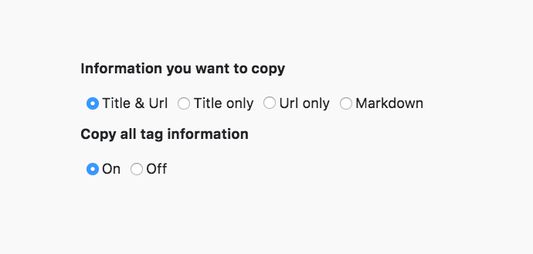
・You can select the information that can be copied from "title & URL", "title only", "URL only" or "Markdown".
・You can choose whether or not to activate functions that can obtain all tabs
文字を選択していない状態でcommand+c (mac) or ctrl+c (win) を押下した時、サイトのタイトルとURLをクリップボードに保存します。
全タブを取得したい場合: command+c+x (mac) or ctrl+c+x (win)。
■オプション設定
・コピーできる情報を「タイトル&URL」、「タイトルのみ」、「URLのみ」、「マークダウン」の4つから選択可能できます。
・全タブ取得できる機能を動作させるかどうか選択できます。
When you want to acquire all tabs: command+c+x (mac) or ctrl+c+x (win).
■option setting
・You can select the information that can be copied from "title & URL", "title only", "URL only" or "Markdown".
・You can choose whether or not to activate functions that can obtain all tabs
文字を選択していない状態でcommand+c (mac) or ctrl+c (win) を押下した時、サイトのタイトルとURLをクリップボードに保存します。
全タブを取得したい場合: command+c+x (mac) or ctrl+c+x (win)。
■オプション設定
・コピーできる情報を「タイトル&URL」、「タイトルのみ」、「URLのみ」、「マークダウン」の4つから選択可能できます。
・全タブ取得できる機能を動作させるかどうか選択できます。
امتیاز ۴٫۶ توسط ۲۰ بررسیکننده
دسترسیها و دادهها
اطلاعات بیشتر
- پیوندهای افزونه
- نسخه
- 1.4.1
- اندازه
- ۱۸٫۲۵ کیلوبایت
- آخرین بهروزرسانی
- ۶ سال پیش (۲۶ سپتامبر ۲۰۲۰)
- دستهبندیهای مرتبط
- تاریخچهٔ نسخهها
- افزودن به مجموعه