
Tablet Gestures em_te توسط
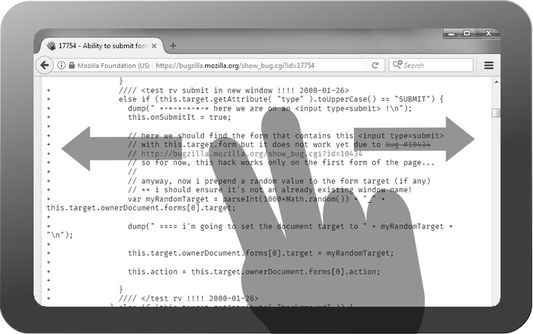
Use 2 finger swipes to control your browser. Supports 8 directions with configurable actions. Designed for Tablets.
۱۲۹ کاربر۱۲۹ کاربر
فرادادهٔ افزونه
تصاویر صفحه
دربارهٔ این افزونه
Perform 2 finger gestures on multi-touch screens (such as tablets) in any of 8 directions to invoke certain actions.
Supported actions include:
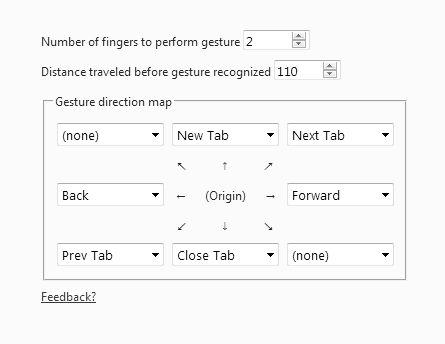
The default configuration is:
The gesture is only recognized if your fingers move in parallel in the same direction. If you do "pinches", it will not respond, because the pinch is reserved for zooming the page. Since Firefox's innate pinch-to-zoom feature is still not mature, you can turn it off by going into "about:config" and type "browser.gesture.pinch" and double-click on "browser.gesture.pinch.in" and "browser.gesture.pinch.out" and set the values to the empty string.
You can also configure how many fingers are required to perform gestures in case 2 fingers is too easy to accidentally activate.
You can also configure how long the fingers need to travel (in pixels) before a gesture is recognized. The default is 110 pixels which is suitable for medium-sized devices.
You don't need to lift your fingers at the end for the gesture to recognize. Just keep moving them in the desired direction and once it reaches the threshold the gesture will activate automatically.
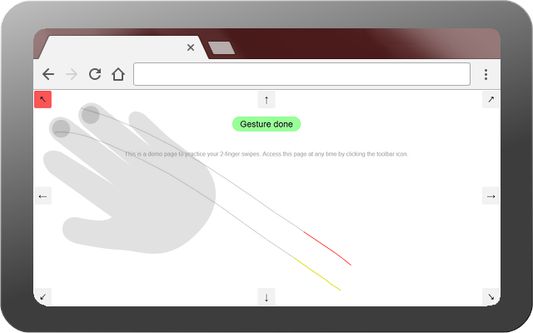
You can practice your gestures in the demo page that opens up when installed and when you click on the toolbar icon. If the toolbar icon isn't visible, you may need to customize the Firefox toolbar to add it to the toolbar.
Note that this only works on multi-touch screens and not multi-touch trackpads.
Try my other related extension, Joystick and NaviTouch for tablets.
Supported actions include:
- open a new tab
- close current tab
- go to left tab
- go to right tab
- go back in current page
- go forward in current page
- duplicate current tab
- reload current tab
The default configuration is:
- open new tab on "up" gesture
- close current tab on "down" gesture
- focus left tab on diagonal "top-left" gesture or diagonal "bottom-left" gesture
- focus right tab on diagonal "bottom-right" gesture or diagonal "top-right" gesture
The gesture is only recognized if your fingers move in parallel in the same direction. If you do "pinches", it will not respond, because the pinch is reserved for zooming the page. Since Firefox's innate pinch-to-zoom feature is still not mature, you can turn it off by going into "about:config" and type "browser.gesture.pinch" and double-click on "browser.gesture.pinch.in" and "browser.gesture.pinch.out" and set the values to the empty string.
You can also configure how many fingers are required to perform gestures in case 2 fingers is too easy to accidentally activate.
You can also configure how long the fingers need to travel (in pixels) before a gesture is recognized. The default is 110 pixels which is suitable for medium-sized devices.
You don't need to lift your fingers at the end for the gesture to recognize. Just keep moving them in the desired direction and once it reaches the threshold the gesture will activate automatically.
You can practice your gestures in the demo page that opens up when installed and when you click on the toolbar icon. If the toolbar icon isn't visible, you may need to customize the Firefox toolbar to add it to the toolbar.
Note that this only works on multi-touch screens and not multi-touch trackpads.
Try my other related extension, Joystick and NaviTouch for tablets.
امتیاز ۳٫۱ توسط ۲۵ بررسیکننده
دسترسیها و دادهها
اطلاعات بیشتر
- پیوندهای افزونه
- نسخه
- 0.1.2resigned1
- اندازه
- ۲۲٫۱ کیلوبایت
- آخرین بهروزرسانی
- ۲ سال پیش (۲۵ آوریل ۲۰۲۴)
- مجوز
- مجوز MIT
- تاریخچهٔ نسخهها
- افزودن به مجموعه