
Sync To IO Drive IO Integration توسط
FireFox extension for IO Drive
۳ کاربر۳ کاربر
فرادادهٔ افزونه
تصاویر صفحه
دربارهٔ این افزونه
‘Sync to IO Drive’ is a browser extension that enables users to synchronize files and folders from a Xinet Digital Assets Management ( DAM ) to an end user’s Mac Desktop.
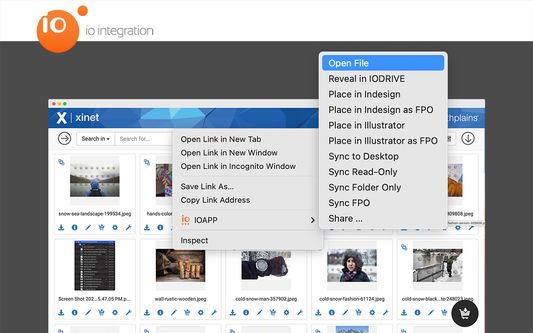
1. In the Xinet DAM, just choose which files or folders you want to work with on your local desktop.
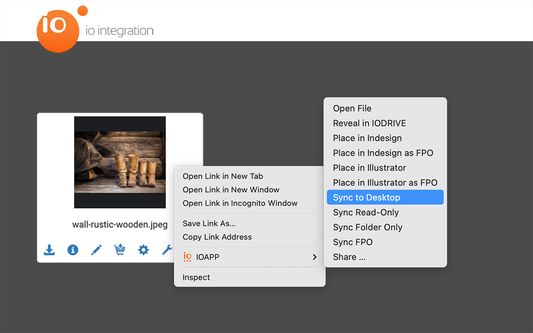
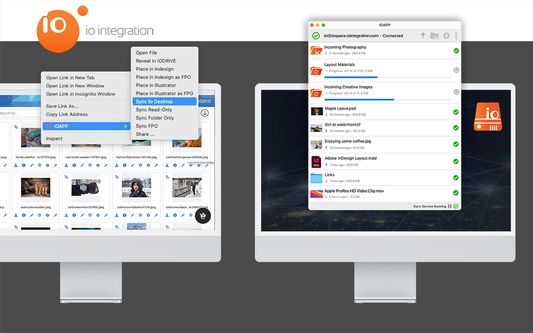
2. Right-clicking on a thumbnail and selecting ‘IO APP’ reveals a menu with options to sync and edit the file directly on your desktop.
3. Edit your assets in any desktop app and save your edits to the IO Drive sync folder.
4. Any edits will be synced to the Xinet DAM without any additional steps required by the user
Additional features available in the browser extension menu are:
- Sync to Desktop: Check-out the asset from the DAM and sync it to your local desktop
- Sync Read-Only: Sync the asset to your local desktop without locking
- Sync FPO: Sync a FPO (For Placement Only) asset to your local desktop
- Sync Folders: Syncs an entire folder structure to your local desktop without syncing the content
- Open: Syncs and opens the asset in the default macOS application on your client
- Place: Places the asset on an Adobe® InDesign or Illustrator page
- Share: Share and password protect your assets
The ‘Sync to IO Drive’ browser extension requires a valid licence for the IO Drive macOS Desktop application to work. Get in touch with IO Integration today and take a look at https://www.iointegration.com/io/io-drive/ for further details.
1. In the Xinet DAM, just choose which files or folders you want to work with on your local desktop.
2. Right-clicking on a thumbnail and selecting ‘IO APP’ reveals a menu with options to sync and edit the file directly on your desktop.
3. Edit your assets in any desktop app and save your edits to the IO Drive sync folder.
4. Any edits will be synced to the Xinet DAM without any additional steps required by the user
Additional features available in the browser extension menu are:
- Sync to Desktop: Check-out the asset from the DAM and sync it to your local desktop
- Sync Read-Only: Sync the asset to your local desktop without locking
- Sync FPO: Sync a FPO (For Placement Only) asset to your local desktop
- Sync Folders: Syncs an entire folder structure to your local desktop without syncing the content
- Open: Syncs and opens the asset in the default macOS application on your client
- Place: Places the asset on an Adobe® InDesign or Illustrator page
- Share: Share and password protect your assets
The ‘Sync to IO Drive’ browser extension requires a valid licence for the IO Drive macOS Desktop application to work. Get in touch with IO Integration today and take a look at https://www.iointegration.com/io/io-drive/ for further details.
امتیاز ۰ توسط ۱ بررسیکننده
دسترسیها و دادهها
دسترسیهای الزامی:
- تبادل پیام با برنامههایی غیر از فایرفاکس
- نمایش اعلانها به شما
- دسترسی به زبانههای مرورگر
- دسترسی به دادههای شما در همهٔ وبسایتها
اطلاعات بیشتر
- پیوندهای افزونه
- نسخه
- 0.19
- اندازه
- ۸۵٫۳۴ کیلوبایت
- آخرین بهروزرسانی
- ۴ سال پیش (۲۵ ژانویه ۲۰۲۳)
- دستهبندیهای مرتبط
- تاریخچهٔ نسخهها
- برچسبها
- افزودن به مجموعه