
SuperEmotes superemotesapp توسط
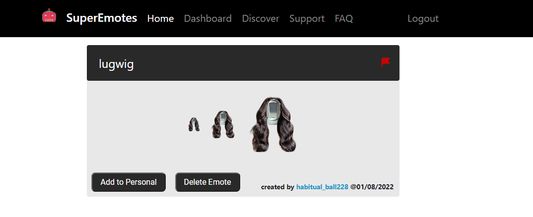
SuperEmotes lets you upload and add public emotes to your personal emote inventory (we call theme "slots") that people can now use on your channel live chat and comments. We also let you see video tags and use themes for live chat.
۳ کاربر۳ کاربر
فرادادهٔ افزونه
تصاویر صفحه



دربارهٔ این افزونه
You can find emotes uploaded by other users and add them to your emote "slots" or upload your own emotes at https://superemotes.com.
Emotes that you add to your slots will be available for your YouTube viewers in both the live chat and comment sections. (We are the only app at the moment that does comment section emotes.)
The emotes are compatible with live chat, popout live chat, studio live chat, studio popout chat, comment sections, and community tab comment sections.
There is also a special kind of slot called a "personal emote slot" where you can bring your emotes to other channels even if they have not added that emote to their slot. This is more of a viewer-centric feature. (We are also the only app at the moment that does personal emote for YouTube)
BTW an emote is basically an emoji or emoticon, but it is a bit more powerful since you can add animations to it.
It could be a png file or a gif.
Right now we accept uploads with file size of 112pxx112px and < 1MB
We also decided to add a feature that lets users "react" to videos with our emotes. (Similar to other platforms)
The extension also allows users to choose a theme for the live chat.
By default, if you don't choose a theme then the app will sync with your YouTube theme settings (light/dark).
We also have a dashboard menu where you can toggle/manipulate features. It is a bit sparse right now, but we expect that will change pretty soon.
You can help change that by reaching out to us by visiting the Support section of our website at https://superemotes.com.
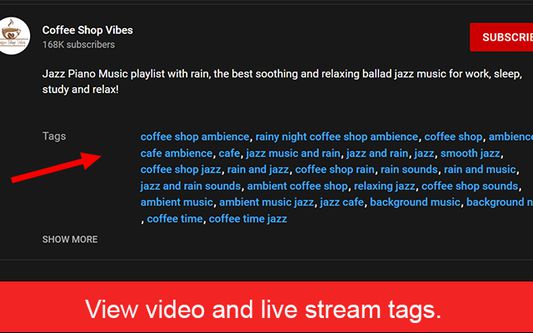
We also added a feature where you can view the tags or keywords for a video or live stream.
This next section is a more formal feature list:
---------------------------------------------------------------------------------------------------------------------------------------------------------
---------------------------------------------------------------------------------------------------------------------------------------------------------
Uploading Custom Emotes OR Using public/shared emotes:
1.) Make an account at https://superemotes.com by logging in with your Youtube Channel.
2.) You can add emotes uploaded by other users by visiting the Discover tab or you can upload your own using the Dashboard tab.
3.) Install this extension.
4.) People who visit your channel will now be able to use the emotes. To use the emotes they need to find the icon that looks like our logo and click the icon. An emotes tray will appear where they can see the emotes for your channel. Clicking the emote of their choice will type for them.
Emote Reactions
-----------------------------
You can react to any YouTube video with any of our global emotes!
Emotes Types Available
-----------------------------------------
We have global emotes that are available to all users.
We have uploaded emotes that are available to users that visit your channel.
We have personal emotes that are available to any channel that you visit.
Live Stream And Comments Capabilities
------------------------------------------
We provide the ability to map live stream chats, live stream replays, and comment sections.
Community Comments Section
-------------------------------------------
The comment mapping works with the community section as well.
Themes Available
------------------------------------------
We provide both dark and light themes
Live Stream Themes Available
------------------------------------------------
We provide themes for use in live chat.
Dashboard Menu
------------------------------------------
We provide our own easily accessible menu where you can toggle features.
More Features
-------------------------------------------
Coming soon!
If you have any more features please reach out to us under the Support section of our website at https://superemotes.com !
Instructions:
1.) Make an account at https://superemotes.com by logging in with your Youtube Channel.
2.) You can add emotes uploaded by other users by visiting the Discover tab or you can upload your own using the Dashboard tab.
3.) Install this extension.
4.) Now when another user visits your live stream or a youtube video that you own when the extension is installed, they will see the emotes you created when the emote text you chose for your emote appears as text.
Emotes that you add to your slots will be available for your YouTube viewers in both the live chat and comment sections. (We are the only app at the moment that does comment section emotes.)
The emotes are compatible with live chat, popout live chat, studio live chat, studio popout chat, comment sections, and community tab comment sections.
There is also a special kind of slot called a "personal emote slot" where you can bring your emotes to other channels even if they have not added that emote to their slot. This is more of a viewer-centric feature. (We are also the only app at the moment that does personal emote for YouTube)
BTW an emote is basically an emoji or emoticon, but it is a bit more powerful since you can add animations to it.
It could be a png file or a gif.
Right now we accept uploads with file size of 112pxx112px and < 1MB
We also decided to add a feature that lets users "react" to videos with our emotes. (Similar to other platforms)
The extension also allows users to choose a theme for the live chat.
By default, if you don't choose a theme then the app will sync with your YouTube theme settings (light/dark).
We also have a dashboard menu where you can toggle/manipulate features. It is a bit sparse right now, but we expect that will change pretty soon.
You can help change that by reaching out to us by visiting the Support section of our website at https://superemotes.com.
We also added a feature where you can view the tags or keywords for a video or live stream.
This next section is a more formal feature list:
---------------------------------------------------------------------------------------------------------------------------------------------------------
---------------------------------------------------------------------------------------------------------------------------------------------------------
Uploading Custom Emotes OR Using public/shared emotes:
1.) Make an account at https://superemotes.com by logging in with your Youtube Channel.
2.) You can add emotes uploaded by other users by visiting the Discover tab or you can upload your own using the Dashboard tab.
3.) Install this extension.
4.) People who visit your channel will now be able to use the emotes. To use the emotes they need to find the icon that looks like our logo and click the icon. An emotes tray will appear where they can see the emotes for your channel. Clicking the emote of their choice will type for them.
Emote Reactions
-----------------------------
You can react to any YouTube video with any of our global emotes!
Emotes Types Available
-----------------------------------------
We have global emotes that are available to all users.
We have uploaded emotes that are available to users that visit your channel.
We have personal emotes that are available to any channel that you visit.
Live Stream And Comments Capabilities
------------------------------------------
We provide the ability to map live stream chats, live stream replays, and comment sections.
Community Comments Section
-------------------------------------------
The comment mapping works with the community section as well.
Themes Available
------------------------------------------
We provide both dark and light themes
Live Stream Themes Available
------------------------------------------------
We provide themes for use in live chat.
Dashboard Menu
------------------------------------------
We provide our own easily accessible menu where you can toggle features.
More Features
-------------------------------------------
Coming soon!
If you have any more features please reach out to us under the Support section of our website at https://superemotes.com !
Instructions:
1.) Make an account at https://superemotes.com by logging in with your Youtube Channel.
2.) You can add emotes uploaded by other users by visiting the Discover tab or you can upload your own using the Dashboard tab.
3.) Install this extension.
4.) Now when another user visits your live stream or a youtube video that you own when the extension is installed, they will see the emotes you created when the emote text you chose for your emote appears as text.
امتیاز ۰ توسط ۱ بررسیکننده
دسترسیها و دادهها
دسترسیهای الزامی:
- دسترسی به دادههای شما برای سایتهای دامنه youtube.com
- دسترسی به دادههای شما برای سایتهای دامنه facebook.com
- دسترسی به دادههای شما برای api.superemotes.com
- دسترسی به دادههای شما برای studio.youtube.com
اطلاعات بیشتر
- پیوندهای افزونه
- نسخه
- 1.4.1
- اندازه
- ۲۲۶٫۶ کیلوبایت
- آخرین بهروزرسانی
- ۵ سال پیش (۲۸ ژانویه ۲۰۲۲)
- دستهبندیهای مرتبط
- مجوز
- Custom License
- خطمشی رازداری
- خطمشی رازداری این افزونه را مطالعه کنید
- تاریخچهٔ نسخهها
- افزودن به مجموعه