Spectrum Mute -str- توسط
Mute users in chat lobby with right click. Works only on robertsspaceindustries.com/spectrum You need to have Star Citizen account for this add-on. Sign up here: https://goo.gl/LPX8tf How to use: https://youtu.be/UfkmjqG3czg ©️TigersClaw
بدون کاربربدون کاربر
فرادادهٔ افزونه
تصاویر صفحه
دربارهٔ این افزونه
Spectrum Mute - Browser extension - Help
This is a customization for Star Citizen members. If you're not yet part of Star Citizen, a science fiction space sim project from Chris Roberts, the creator of the Wing Commander series, you may find more info below and maybe join as well:
Sign up with my referral code for bonuses!
The Star Citizen website features a forum and chat room system, called Spectrum with hundreds of members. This add-on gives you a missing feature, to mute a user in chat.
There's two ways to do it:
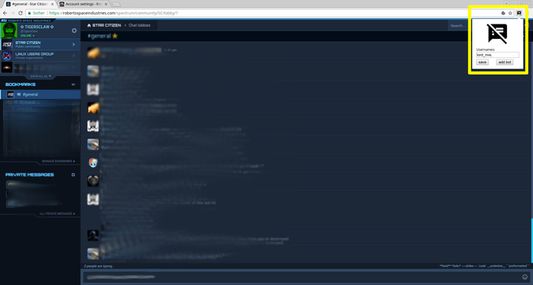
1) click on the icon in the browser bar and paste or type the username in the text field. Then save.
2) Mark the username in chat, the part with the "@" and right click and press mute in the context menu. Here's video how to do it:
https://youtu.be/UfkmjqG3czg
To un-mute a username simply click the icon and delete the username again and hit save.
Reload the page to load all old messages again that were "hidden" before.
Note: The "add bot"-button is for a special chat room not open to the public. In it a special bot feature will be muted with this button. Ignore it if you don't know about that room.
This is a customization for Star Citizen members. If you're not yet part of Star Citizen, a science fiction space sim project from Chris Roberts, the creator of the Wing Commander series, you may find more info below and maybe join as well:
Sign up with my referral code for bonuses!
The Star Citizen website features a forum and chat room system, called Spectrum with hundreds of members. This add-on gives you a missing feature, to mute a user in chat.
There's two ways to do it:
1) click on the icon in the browser bar and paste or type the username in the text field. Then save.
2) Mark the username in chat, the part with the "@" and right click and press mute in the context menu. Here's video how to do it:
https://youtu.be/UfkmjqG3czg
To un-mute a username simply click the icon and delete the username again and hit save.
Reload the page to load all old messages again that were "hidden" before.
Note: The "add bot"-button is for a special chat room not open to the public. In it a special bot feature will be muted with this button. Ignore it if you don't know about that room.
امتیاز ۰ توسط ۱ بررسیکننده
دسترسیها و دادهها
دسترسیهای الزامی:
- دسترسی به زبانههای مرورگر
- دسترسی به دادههای شما برای robertsspaceindustries.com
اطلاعات بیشتر
- پیوندهای افزونه
- نسخه
- 3.1resigned1
- اندازه
- ۱۴٫۱۳ کیلوبایت
- آخرین بهروزرسانی
- ۳ سال پیش (۲۵ آوریل ۲۰۲۴)
- دستهبندیهای مرتبط
- تاریخچهٔ نسخهها
- افزودن به مجموعه