
Souffleur Tingler توسط
Efficiently manage and access prompts for Large Language Models like ChatGPT, Claude, and Gemini. Streamline your AI interactions with quick prompt retrieval and customization.
۸ کاربر۸ کاربر
فرادادهٔ افزونه
تصاویر صفحه
دربارهٔ این افزونه
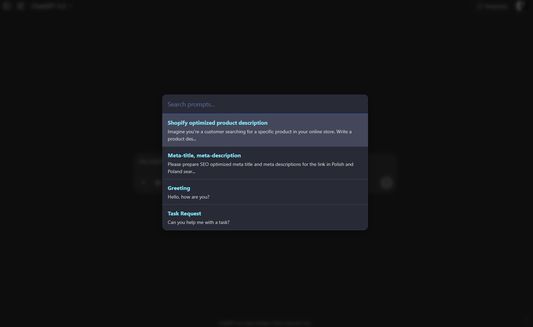
A Firefox extension for managing and quickly accessing prompts for Large Language Models with a MacOS Spotlight-like interface.
Features
How to Use
Keyboard Shortcuts
(You can customize these shortcuts by navigating to
Features
- MacOS Spotlight-like Interface: Press
Ctrl+Shift+Uto open a spotlight-style overlay in the middle of the viewport. - Chatbot Agnostic: Works on any website, not just specific LLM platforms.
- Clipboard Integration: Selected prompts are copied to clipboard instead of being inserted into input fields.
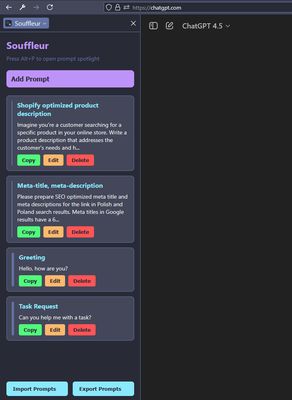
- Prompt Management: Add, edit, delete, and reorder prompts through the Firefox Sidebar
- Import/Export: Import and export your prompts as JSON files
- Improved UX (v4.7): Spotlight overlay closes instantly upon prompt selection, with a brief "Prompt Copied!" feedback message shown. Focus returns to the previously active element.
- Manifest V3: Updated core using Manifest V3 with Firefox-compatible APIs.
How to Use
- Add Prompts: Open the Sidebar (click the extension icon or press Ctrl+Shift+L) and add your prompts.
- Access Prompts: Press Alt+P to open the spotlight overlay, search for a prompt, and press Enter to copy it to clipboard.
- Manage Prompts: Use the Sidebar to edit, delete, or reorder your prompts.
- Import/Export: Use the buttons at the bottom of the Sidebar to import or export your prompts as JSON.
Keyboard Shortcuts
Ctrl+Alt+P: Toggle the SidebarAlt+P: Open the spotlight overlay
(You can customize these shortcuts by navigating to
about:addons, clicking the gear icon ⚙️, and selecting "Manage Extension Shortcuts".)امتیاز ۰ توسط ۱ بررسیکننده
دسترسیها و دادهها
دسترسیهای الزامی:
- وارد کردن دادهها به کلیپبورد
- دسترسی به زبانههای مرورگر
- دسترسی به دادههای شما در همهٔ وبسایتها
دسترسیهای اختیاری:
- دسترسی به دادههای شما در همهٔ وبسایتها
اطلاعات بیشتر
- پیوندهای افزونه
- نسخه
- 4.7.7
- اندازه
- ۵۸٫۹۸ کیلوبایت
- آخرین بهروزرسانی
- یک سال پیش (۲۳ ژوئیه ۲۰۲۵)
- دستهبندیهای مرتبط
- مجوز
- مجوز MIT
- تاریخچهٔ نسخهها
- افزودن به مجموعه