
Simple Temporary Containers ninevra توسط
Isolate tabs in temporary containers. Uses only the minimum permissions and stores no data.
فرادادهٔ افزونه
تصاویر صفحه
دربارهٔ این افزونه
Isolate tabs in temporary containers. Uses only the minimum permissions and stores no data.
What are containers?
Containers group tabs into isolated contexts, each with its own separate cookies and website data. Tabs in one container can't see cookies from any other container. That lets you sign in to an account in one container and use a different account or stay signed out in another, and makes it harder (though not impossible) to track you across containers.
What are temporary containers?
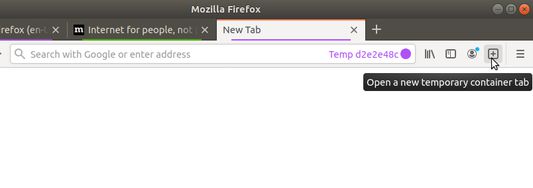
This extension makes it easy to create temporary containers, which start out blank with no cookies or saved website data, and are automatically removed when you close all their tabs.
Using temporary containers
You can create temporary containers in several ways:
Privacy
Uses no major permissions (permissions that show warnings to users and are listed on addons.mozilla.org).
Uses only the minimum minor permissions:
No user data is stored or sent anywhere.
Using Simple Temorary Containers with other extensions
Firefox Multi-Account Containers by Mozilla
Provides a convenient interface for listing, creating, and modifying containers. It's helpful for renaming temporary containers to make them persistent.
However, Simple Temporary Containers is not currently compatible with its "Container Sync" feature, so be sure to leave that feature disabled.
New container tab by Jonathan Kingston
Provides a keyboard shortcut for opening a new tab in the same container as the current tab. It's helpful for opening multiple pages in the same temporary container.
Open external links in a container by Denys H
Provides a means of opening links from the command line or from other applications in the container of your choice. Use
Prior art
Temporary Containers by stoically is another wonderful extension serving the same purpose. Temporary Containers offers many more features at the cost of more complexity and many more permissions. My goal with Simple Temporary Containers is to provide the basic functionality with as few permissions as possible and, hopefully, easily-auditable code.
Auditing the code
If you're curious or really want to see what you're installing, you can read the source code in the git repository or by right-clicking the "Add to Firefox" button and selecting "Save link as" to download the extension without installing it. Extensions are packaged in zip archives with filenames ending in
What are containers?
Containers group tabs into isolated contexts, each with its own separate cookies and website data. Tabs in one container can't see cookies from any other container. That lets you sign in to an account in one container and use a different account or stay signed out in another, and makes it harder (though not impossible) to track you across containers.
What are temporary containers?
This extension makes it easy to create temporary containers, which start out blank with no cookies or saved website data, and are automatically removed when you close all their tabs.
Using temporary containers
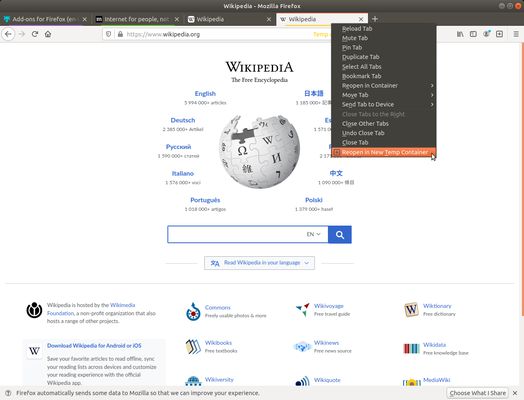
You can create temporary containers in several ways:
- By clicking the extension's icon in the navigation bar.
- By right-clicking on a link and selecting "Open Link in New Temp Container Tab".
- By right-clicking on a tab in the tab bar and selecting "Reopen in New Temp Container".
- By pressing
Ctrl+Alt+C. (Keybindings can be customized inabout:addons-> settings dropdown -> Manage Extension Shortcuts.) - By creating a container called
%NEW_TEMP_CONTAINER%. (This is mostly useful for integrating with other extensions that create containers.)
about:preferences#containers or using Firefox Multi-Account Containers).Privacy
Uses no major permissions (permissions that show warnings to users and are listed on addons.mozilla.org).
Uses only the minimum minor permissions:
"contextualIdentities": Allows creating and removing containers."cookies": Allows creating tabs in containers and to seeing which container each tab is in."menus": Allows adding items to context (right-click) menus.
No user data is stored or sent anywhere.
Using Simple Temorary Containers with other extensions
Firefox Multi-Account Containers by Mozilla
Provides a convenient interface for listing, creating, and modifying containers. It's helpful for renaming temporary containers to make them persistent.
However, Simple Temporary Containers is not currently compatible with its "Container Sync" feature, so be sure to leave that feature disabled.
New container tab by Jonathan Kingston
Provides a keyboard shortcut for opening a new tab in the same container as the current tab. It's helpful for opening multiple pages in the same temporary container.
Open external links in a container by Denys H
Provides a means of opening links from the command line or from other applications in the container of your choice. Use
%NEW_TEMP_CONTAINER% to open links in temporary containers:firefox "ext+container:name=%NEW_TEMP_CONTAINER%&url=https://mozilla.org/"Prior art
Temporary Containers by stoically is another wonderful extension serving the same purpose. Temporary Containers offers many more features at the cost of more complexity and many more permissions. My goal with Simple Temporary Containers is to provide the basic functionality with as few permissions as possible and, hopefully, easily-auditable code.
Auditing the code
If you're curious or really want to see what you're installing, you can read the source code in the git repository or by right-clicking the "Add to Firefox" button and selecting "Save link as" to download the extension without installing it. Extensions are packaged in zip archives with filenames ending in
.xpi.Compatibility warning: Simple Temporary Containers is currently not compatible with the Containers Sync feature of Firefox Multi-Account Containers introduced in version 6.2.0. Using Containers Sync with Simple Temporary Containers may result in temporary containers incorrectly persisting and/or having mangled names.
امتیاز ۴٫۸ توسط ۱۰ بررسیکننده
اطلاعات بیشتر
- پیوندهای افزونه
- نسخه
- 0.3.0
- اندازه
- ۱۵٫۴ کیلوبایت
- آخرین بهروزرسانی
- ۳ سال پیش (۳۰ ژانویه ۲۰۲۴)
- دستهبندیهای مرتبط
- تاریخچهٔ نسخهها
- افزودن به مجموعه