
Right Links WE Infocatcher توسط
This extension allows to open links in new tabs with right-click directly and using “long” left-click. This is very useful for touchpads on notebooks and for mice without middle button.
۱٬۱۳۸ کاربر۱٬۱۳۸ کاربر
فرادادهٔ افزونه
تصاویر صفحه


دربارهٔ این افزونه
WebExtensions and support for Firefox 57+
https://github.com/Infocatcher/Right_Links/issues/31
https://github.com/Infocatcher/Right_Links_WE#issues
In progress, but with limitations due to lack of new APIs from Firefox side.
Beta versions with Firefox 57+ support: https://github.com/Infocatcher/Right_Links_WE/releases
This extension allows to open links in new tabs with right-click directly and using “long” left-click.
This is very useful for touchpads on notebooks and for mice without middle button.
It works with links, bookmarks, history items and images.
Hold any modifier (Ctrl, Alt or Shift) during right-click to show context menu.
Or just wait (without releasing the button) for 0.5 seconds (configurable).
F2 or Tools – Right Links (or simply click on icon in status bar) to switch on/off.
Also you can add toolbar button (View – Toolbar – Customize).
Note: JavaScript-links loads in current tab.
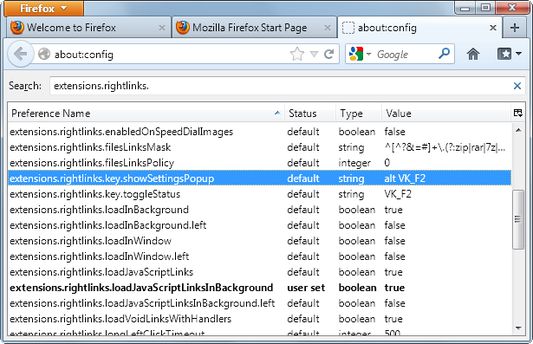
There are some hidden hidden options in about:config page:
extensions.rightlinks.showContextMenuTimeout – timeout before context menu will be shown (in milliseconds), use -1 to disable this feature.
extensions.rightlinks.longLeftClickTimeout – delay for “long” left-click.
extensions.rightlinks.notifyOpenTime – hide pop-up message after this time is over, use -1 to disable.
extensions.rightlinks.loadInWindow, extensions.rightlinks.loadInWindow.left – open links in new windows instead of new tabs (some features don't work!).
extensions.rightlinks.filesLinksMask – mask of links to files (use regular expressions).
extensions.rightlinks.filesLinksPolicy
0 – don't check links
1 – open links to files in current tab
2 – disable Right Links on these links (will be shown context menu)
3 – copy link location (since version 0.3.8.1)
Hotkeys customization:
extensions.rightlinks.key.toggleStatus
extensions.rightlinks.key.showSettingsPopup
Value: modifiers + key
You can use following modifiers: control, alt, shift, meta, accel or os, see documentation for more info.
Key: any character or special code.
Example for Ctrl+Alt+R:
extensions.rightlinks.key.toggleStatus = "control alt R"
Or leave these preferences empty to disable hotkeys.
Warning! Open new window (or restart Firefox) to apply the changes.
Note: some combinations of key and modifiers don't work.
See also
In English: http://forums.mozillazine.org/viewtopic.php?t=645809
In Russian: http://forum.mozilla-russia.org/viewtopic.php?id=19960
Source code and issues tracker: https://github.com/Infocatcher/Right_Links
https://github.com/Infocatcher/Right_Links/issues/31
https://github.com/Infocatcher/Right_Links_WE#issues
In progress, but with limitations due to lack of new APIs from Firefox side.
Beta versions with Firefox 57+ support: https://github.com/Infocatcher/Right_Links_WE/releases
This extension allows to open links in new tabs with right-click directly and using “long” left-click.
This is very useful for touchpads on notebooks and for mice without middle button.
It works with links, bookmarks, history items and images.
Hold any modifier (Ctrl, Alt or Shift) during right-click to show context menu.
Or just wait (without releasing the button) for 0.5 seconds (configurable).
F2 or Tools – Right Links (or simply click on icon in status bar) to switch on/off.
Also you can add toolbar button (View – Toolbar – Customize).
Note: JavaScript-links loads in current tab.
There are some hidden hidden options in about:config page:
extensions.rightlinks.showContextMenuTimeout – timeout before context menu will be shown (in milliseconds), use -1 to disable this feature.
extensions.rightlinks.longLeftClickTimeout – delay for “long” left-click.
extensions.rightlinks.notifyOpenTime – hide pop-up message after this time is over, use -1 to disable.
extensions.rightlinks.loadInWindow, extensions.rightlinks.loadInWindow.left – open links in new windows instead of new tabs (some features don't work!).
extensions.rightlinks.filesLinksMask – mask of links to files (use regular expressions).
extensions.rightlinks.filesLinksPolicy
0 – don't check links
1 – open links to files in current tab
2 – disable Right Links on these links (will be shown context menu)
3 – copy link location (since version 0.3.8.1)
Hotkeys customization:
extensions.rightlinks.key.toggleStatus
extensions.rightlinks.key.showSettingsPopup
Value: modifiers + key
You can use following modifiers: control, alt, shift, meta, accel or os, see documentation for more info.
Key: any character or special code.
Example for Ctrl+Alt+R:
extensions.rightlinks.key.toggleStatus = "control alt R"
Or leave these preferences empty to disable hotkeys.
Warning! Open new window (or restart Firefox) to apply the changes.
Note: some combinations of key and modifiers don't work.
See also
In English: http://forums.mozillazine.org/viewtopic.php?t=645809
In Russian: http://forum.mozilla-russia.org/viewtopic.php?id=19960
Source code and issues tracker: https://github.com/Infocatcher/Right_Links
امتیاز ۴٫۹ توسط ۵۶ بررسیکننده
دسترسیها و دادهها
دسترسیهای الزامی:
- نمایش اعلانها به شما
- دسترسی به زبانههای مرورگر
- دسترسی به دادههای شما در همهٔ وبسایتها
اطلاعات بیشتر
- پیوندهای افزونه
- نسخه
- 0.5b12
- اندازه
- ۲۸٫۲۳ کیلوبایت
- آخرین بهروزرسانی
- ۶ سال پیش (۱۴ مارس ۲۰۲۱)
- تاریخچهٔ نسخهها
- افزودن به مجموعه