افزونه‌های مرورگر فایرفاکس
  • افزونه‌ها
  • پوسته‌ها
    • برای فایرفاکس
    • واژه‌نامه‌ها و بسته‌های زبان
ورود
پیش‌نمایش ResultFlow Extension

ResultFlow Extension Garrett Rohde توسط

The ResultFlow Browser Extension allows an user to add a web-page they're viewing to a feed folder in their ResultFlow app.

شاید برخی ویژگی‌ها نیازمند پرداخت باشندشاید برخی ویژگی‌ها نیازمند پرداخت باشند
5 (۱ بررسی)5 (۱ بررسی)
۱۰ کاربر۱۰ کاربر
فایرفاکس را دریافت کنید و افزونه را بگیرید
دریافت فایل

فرادادهٔ افزونه

تصاویر صفحه
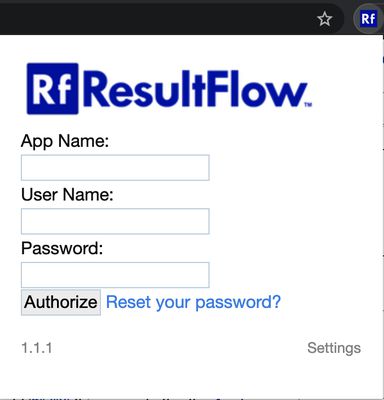
When you first install the extension, you will be presented with this form so you may authorize the extension to interact with your ResultFlow application.  To authorize the extension, you will need to enter:
- Your ResultFlow app name, i.e. your ResultFlow subdomain (https://(your-app-name).resultflow.com)
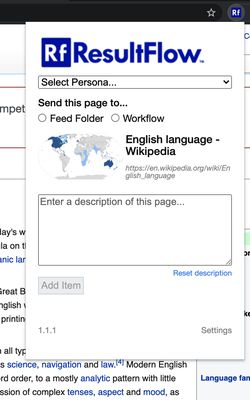
- Your ResultFlow application username and passwordOnce you have authorized the extension, you will see this menu.

To use the extension, visit any webpage you would like to add to one of your feed folders or workflows.  While viewing that page, click the Rf extension icon to open this menu.  Then, select the Persona and either Feed Folder or Workflow to which you wish this item be added, and click "Add Item".

When the item has been successfully added, a confirmation message will be displayed below the button.  Please wait for this message to appear before you close the extension so you can be sure that the item was added.
دربارهٔ این افزونه
This extension allows ResultFlow users to add the content of a web-page or article as an individual item to one of their Feed Folders.

To use the feature offered by this extension, an user must have a ResultFlow application. ResultFlow is a content-curation and automation application offered by Traffic Science, Inc. to help small and medium-sized companies.

This extension is light-weight and offers a simple interface that is quick to use; our focus on automation is all about saving you time.

Setup takes seconds; simply enter your ResultFlow authentication credentials in the extensions authorization prompt. From there, you'll be able to add, as an individual item, any web-page or article you happen across to one of your feed folders, regardless of whether that article is part of an RSS feed or not.
امتیاز ۵ توسط 1 بررسی‌کننده
وارد شوید تا به این افزونه امتیاز دهید
هنوز هیچ امتیازی ثبت نشده است

امتیاز ستاره‌ای ذخیره شد

۵
۱
۴
۰
۳
۰
۲
۰
۱
۰
۱ بررسی را بخوانید
دسترسی‌ها و داده‌ها

دسترسی‌های الزامی:

  • دسترسی به داده‌های شما برای سایت‌های دامنه resultflow.com
اطلاعات بیشتر
اطلاعات بیشتر
پیوند‌های افزونه
  • صفحه نخست
  • سایت پشتیبانی
  • ایمیلٔ پشتیبانی
  • کپی شناسه افزونه
نسخه
1.2.8
اندازه
۱۱۳٫۵۵ کیلوبایت
آخرین به‌روزرسانی
۵ سال پیش (۲۲ آوریل ۲۰۲۲)
دسته‌بندی‌های مرتبط
  • فیدها، اخبار و وبلاگ‌نویسی
مجوز
تمامی حقوق محفوظ است
خط‌مشی رازداری
خط‌مشی رازداری این افزونه را مطالعه کنید
تاریخچهٔ نسخه‌ها
  • نمایش همه نسخه‌ها
افزودن به مجموعه
گزارش این افزونه
رفتن به صفحه اصلی موزیلا

افزونه‌ها

  • درباره
  • وبلاگ افزونه‌های فایرفاکس
  • کارگاه افزونه
  • مرکز توسعه‌دهندگان
  • سیاست‌های توسعه‌دهنده
  • وبلاگ اجتماع
  • انجمن
  • گزارش خطا
  • راهنمای بررسی

بارگیری

  • Download Firefox
  • Windows
  • macOS
  • iOS
  • Android
  • Linux
  • All

آخرین نسخه‌های ساخت

  • Nightly
  • Beta

فایرفاکس برای کسب‌وکار

  • Enterprise

اجتماع

  • Connect
  • Contribute
  • Developer

دنبال کردن

  • Instagram
  • YouTube
  • TikTok
  • Bluesky
  • Podcast
  • حریم‌خصوصی
  • کلوچک‌ها
  • حقوقی

غیر از مواردی که مشخص شده، محتوای این سایت تحت گواهینامه Creative Commons Attribution Share-Alike License v3.0 یا هر نسخه بعدی خواهد بود.