افزونه‌های مرورگر فایرفاکس
  • افزونه‌ها
  • پوسته‌ها
    • برای فایرفاکس
    • واژه‌نامه‌ها و بسته‌های زبان
ورود
پیش‌نمایش Remove/Crop-to Selection

Remove/Crop-to Selection Nikos Asimakis توسط

Remove or crop-to selection from context menu so that you can print or save only the parts you need. Additionally you can remove clicked elements and also remove ads, videos or other third-party content from web pages.

4 (۱۵ بررسی)4 (۱۵ بررسی)
۴۴۷ کاربر۴۴۷ کاربر
فایرفاکس را دریافت کنید و افزونه را بگیرید
دریافت فایل

فرادادهٔ افزونه

تصاویر صفحه
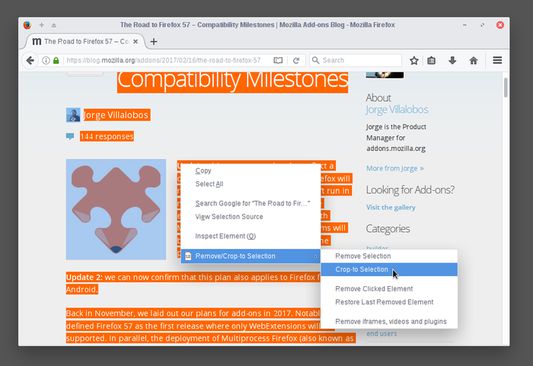
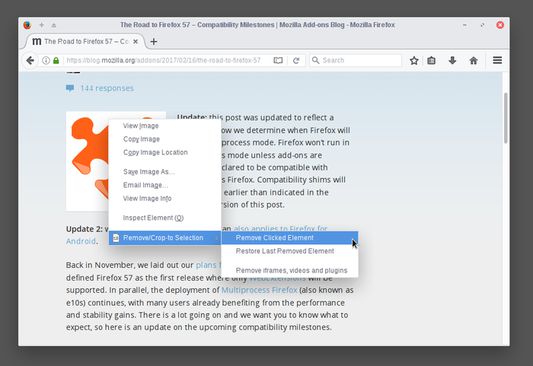
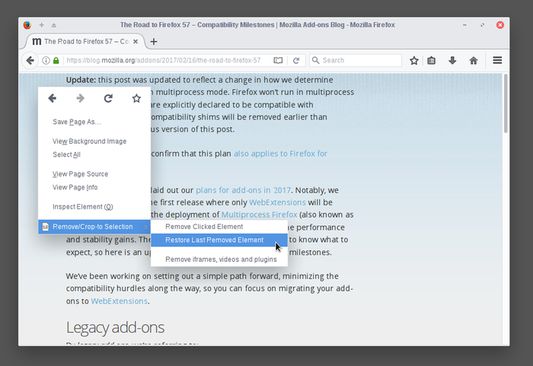
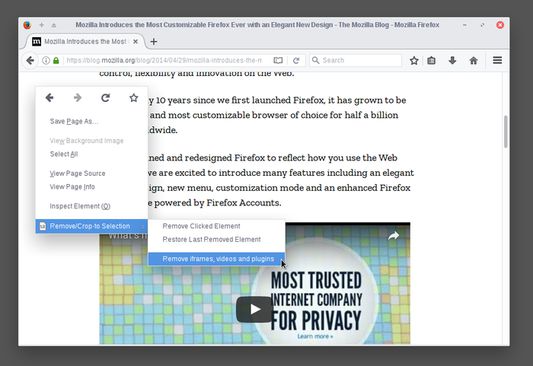
Select a part of a web page, right click and select "Crop-to Selection" to keep only your selection and remove everything else.Right click any element you don't need (images, buttons, widgets) and select "Remove Clicked Element" to remove it.If by mistake you remove something you want (like the article title) right click anywhere on the page and select "Restore Last Removed Element" to restore it. Alternatively, you can reload the page to undo all your changes.To remove ads, videos or other third-party content from the web page, right click anywhere and select "Remove iframes, videos & plugins".By combining everything you can print (or save) only the parts of the web page you want, saving paper and ink.
دربارهٔ این افزونه
Sometimes you may want to print or save only a part of a web page.

With this add-on you can select a part of a web page (text, images, etc), right click on the selection and:
  • click "Remove Selection" from the context menu to remove the selection, or
  • click "Crop-to Selection" to keep only the selection and remove everything else.

Now you can print or save only the parts of a web page you want.

All your changes are local and non permanent and by reloading the web page all your changes are gone.

Additionally, you can right click any element (image, paragraph, title, etc) on the web page and click "Remove Clicked Element" to remove it. To undo your last edit right click and select "Restore Last Removed Element" or simply reload the web page like before.

If your web page contains third party content (like ads, iframes, etc) or multimedia content (like videos, plugins, etc) right click on an empty part of the web page and select "Remove iframes, videos & plugins". This way you can remove annoyances and make sure that they are not included when you print or save the page.
امتیاز ۴ توسط ۱۵ بررسی‌کننده
وارد شوید تا به این افزونه امتیاز دهید
هنوز هیچ امتیازی ثبت نشده است

امتیاز ستاره‌ای ذخیره شد

۵
۱۰
۴
۱
۳
۱
۲
۰
۱
۳
تمام ۱۵ بررسی را بخوانید
دسترسی‌ها و داده‌ها

دسترسی‌های الزامی:

  • دسترسی به داده‌های شما در همهٔ وب‌سایت‌ها
اطلاعات بیشتر
اطلاعات بیشتر
پیوند‌های افزونه
  • کپی شناسه افزونه
نسخه
0.3resigned1
اندازه
۱۷٫۱۲ کیلوبایت
آخرین به‌روزرسانی
۲ سال پیش (۲۵ آوریل ۲۰۲۴)
دسته‌بندی‌های مرتبط
  • توسعه وب
  • ظاهر
مجوز
مجوز عمومی موزیلا ۲.۰ (MPL 2.0)
تاریخچهٔ نسخه‌ها
  • نمایش همه نسخه‌ها
افزودن به مجموعه
گزارش این افزونه
رفتن به صفحه اصلی موزیلا

افزونه‌ها

  • درباره
  • وبلاگ افزونه‌های فایرفاکس
  • کارگاه افزونه
  • مرکز توسعه‌دهندگان
  • سیاست‌های توسعه‌دهنده
  • وبلاگ انجمن
  • انجمن
  • گزارش خطا
  • راهنمای بررسی

بارگیری

  • Download Firefox
  • Windows
  • macOS
  • iOS
  • Android
  • Linux
  • All

آخرین نسخه‌های ساخت

  • Nightly
  • Beta

فایرفاکس برای کسب‌وکار

  • Enterprise

انجمن

  • Connect
  • Contribute
  • Developer

دنبال کردن

  • Instagram
  • YouTube
  • TikTok
  • Bluesky
  • Podcast
  • حریم‌خصوصی
  • کوکی‌ها
  • حقوقی

غیر از مواردی که مشخص شده، محتوای این سایت تحت گواهینامه Creative Commons Attribution Share-Alike License v3.0 یا هر نسخه بعدی خواهد بود.