
Reader Baris Derin توسط
Reader is the ultimate Reader tool for Firefox.
در فایرفاکس برای Android™ موجود استدر فایرفاکس برای Android™ موجود است
۴٬۰۱۴ کاربر۴٬۰۱۴ کاربر
برای باز کردن این افزونه در فایرفاکس اندروید، کد QR را اسکن کنید

فرادادهٔ افزونه
تصاویر صفحه


دربارهٔ این افزونه
Reader is the ultimate Reader tool for your Firefox that provides you the best reading experience by transforming text on any website using fonts, colors, and layouts of your choosing in a clean and distraction free environment.
✓ 16 Million Color
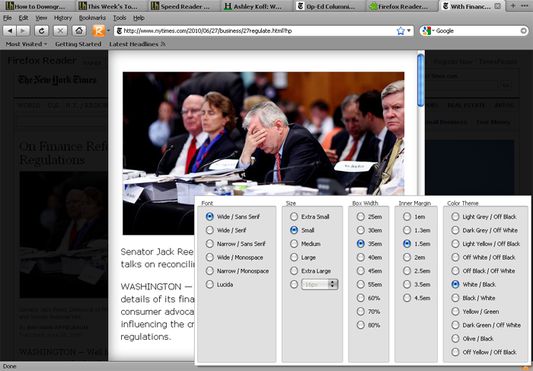
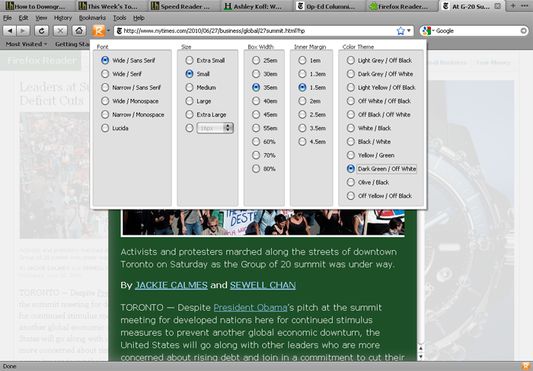
Reader lets you adjust your Reading pane to the ultimate possible level. You can choose any color from Color Pickerpanel for your text, background and anchor elements.
✓ Custom Fonts
Reader lets you assign any Font on your Operating System for your Reading pane. You choose your favorite font from Helvetica to Verdana.
✓ Print Less
Reader lets you print your Reading pane in user and economy friendly way.
✓ Auto Scroll
Reader provides Auto Scroll functionality so that you can read your web pages in a steady pace.
✓ Select and Read
Reader lets you select any portion of the web page and read it by choosing Read in Reader option in the context menu.
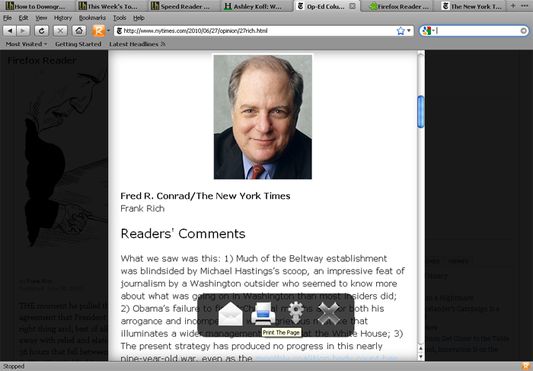
To use it just click the Reader icon on Firefox add-on bar. Also by right clicking on Reader status-bar icon you can get other Styling Options.
After a few seconds the web page will be simplified and you will achieve easy to read content panel. To exit the panel just click anywhere outside the content area.
You can mail and print the page, access options and exit the Reader mode from controls panel.
If the add-on can not achieve a desired success you can manually select the text and then click the add-on bar icon or toolbar icon or choose Read in Reader option from the context menu to get the simplified version of the selected text.
You can also add a Toolbar button to the navigation toolbox. Right click on any toolbar button and choose the “Customise” option to drag the icon in toolbox.
Keyboard short-cut to activate Reader is CTRL+ALT+R combination.
Keyboard short-cut to activate Auto Scroll is CTRL+SHIFT+S combination.
Reader based on Gabriel Coarna's Readable bookmarklet.
✓ 16 Million Color
Reader lets you adjust your Reading pane to the ultimate possible level. You can choose any color from Color Pickerpanel for your text, background and anchor elements.
✓ Custom Fonts
Reader lets you assign any Font on your Operating System for your Reading pane. You choose your favorite font from Helvetica to Verdana.
✓ Print Less
Reader lets you print your Reading pane in user and economy friendly way.
✓ Auto Scroll
Reader provides Auto Scroll functionality so that you can read your web pages in a steady pace.
✓ Select and Read
Reader lets you select any portion of the web page and read it by choosing Read in Reader option in the context menu.
To use it just click the Reader icon on Firefox add-on bar. Also by right clicking on Reader status-bar icon you can get other Styling Options.
After a few seconds the web page will be simplified and you will achieve easy to read content panel. To exit the panel just click anywhere outside the content area.
You can mail and print the page, access options and exit the Reader mode from controls panel.
If the add-on can not achieve a desired success you can manually select the text and then click the add-on bar icon or toolbar icon or choose Read in Reader option from the context menu to get the simplified version of the selected text.
You can also add a Toolbar button to the navigation toolbox. Right click on any toolbar button and choose the “Customise” option to drag the icon in toolbox.
Keyboard short-cut to activate Reader is CTRL+ALT+R combination.
Keyboard short-cut to activate Auto Scroll is CTRL+SHIFT+S combination.
Reader based on Gabriel Coarna's Readable bookmarklet.
امتیاز ۳٫۶ توسط ۱۳۳ بررسیکننده
دسترسیها و دادهها
دسترسیهای الزامی:
- نظارت بر استفاده از افزونه و مدیریت پوستهها
- دسترسی به زبانههای مرورگر
- دسترسی به دادههای شما در همهٔ وبسایتها
اطلاعات بیشتر
- پیوندهای افزونه
- نسخه
- 64.1.1resigned1
- اندازه
- ۲۹۶٫۲۷ کیلوبایت
- آخرین بهروزرسانی
- ۲ سال پیش (۲۵ آوریل ۲۰۲۴)
- دستهبندیهای مرتبط
- تاریخچهٔ نسخهها
- افزودن به مجموعه