
Proxy Navbar Shortcut Pro Private Citizen توسط
Adds a proxy settings shortcut to the navbar with geo location verification. Clean, simple, and uses the browser's existing proxy settings.
۷ کاربر۷ کاربر
فرادادهٔ افزونه
تصاویر صفحه





دربارهٔ این افزونه
This extension adds a proxy shortcut icon to the Firefox navbar with geo location verification, using the proxy settings saved in the browser’s Network Settings.
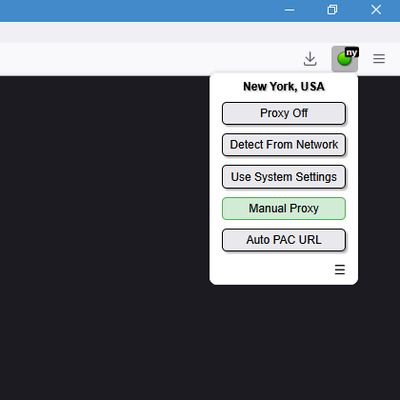
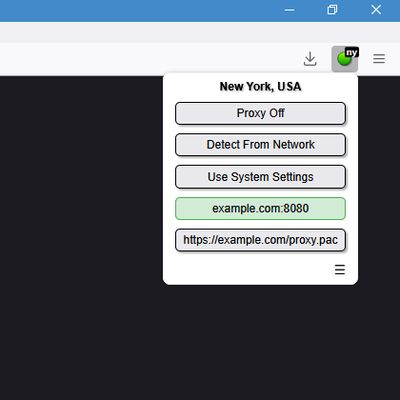
It allows you to turn the proxy on/off and select which proxy in the Network Settings to use while showing the geo location of the connection end point.
To add or edit proxy servers, open Firefox’s normal Network Settings
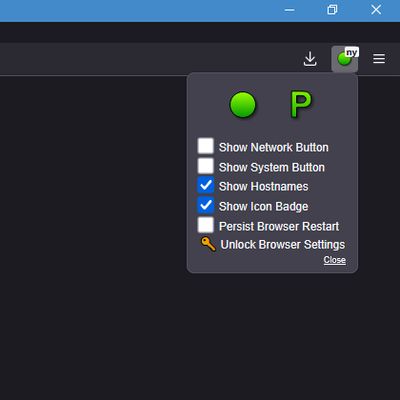
By default this extension will maintain proxy changes across browser restarts. If you would like a default condition (like proxy always on/off on browser startup) set which condition you want to be default in the Network Settings. Then in the proxy shortcut options unselect
GEO LOCATION VERIFICATION
The icon badge on the navbar will display the ISO country code for the connection's location. The full location name will be displayed in the extension window. (See screen shots) For locations in the USA it will display the state ISO code in lowercase. Meaning "ca" would be California while "CA" would be Canada.
The way it works is when you change proxy settings (or on browser startup) the extension will ping a location server. The extension does not send any data, it only makes a SSL encrypted connection to a (API) location server. The server returns a location ISO code based on the IP being used, such as the proxy end point.
If you want the proxy shortcut without geo location verification use the Proxy Navbar Shortcut non-pro version of this extension.
IMPORTANT
Due to how Firefox handles permissions, any extension accessing proxy settings must be allowed to run in private windows. Select
When an extension modifies proxy settings, Firefox locks the normal Network Settings interface and displays a notice about the extension controlling networking settings. You do not need to disable this extension to regain access. Instead:
This unlocks the Network Settings control panel in the browser and restores the default proxy behavior.
PRIVACY NOTICE
This extension does NOT collect or transmit any data, aside from pinging a location server. There is no tracking, finger printing, or analytics.
It only has permission to:
It allows you to turn the proxy on/off and select which proxy in the Network Settings to use while showing the geo location of the connection end point.
To add or edit proxy servers, open Firefox’s normal Network Settings
[about:preferences] and update them there.By default this extension will maintain proxy changes across browser restarts. If you would like a default condition (like proxy always on/off on browser startup) set which condition you want to be default in the Network Settings. Then in the proxy shortcut options unselect
[ ]Persist Browser Restart.GEO LOCATION VERIFICATION
The icon badge on the navbar will display the ISO country code for the connection's location. The full location name will be displayed in the extension window. (See screen shots) For locations in the USA it will display the state ISO code in lowercase. Meaning "ca" would be California while "CA" would be Canada.
The way it works is when you change proxy settings (or on browser startup) the extension will ping a location server. The extension does not send any data, it only makes a SSL encrypted connection to a (API) location server. The server returns a location ISO code based on the IP being used, such as the proxy end point.
If you want the proxy shortcut without geo location verification use the Proxy Navbar Shortcut non-pro version of this extension.
IMPORTANT
Due to how Firefox handles permissions, any extension accessing proxy settings must be allowed to run in private windows. Select
[X]Run in Private Windows during installation, or manually allow it afterward via the [about:addons] page.When an extension modifies proxy settings, Firefox locks the normal Network Settings interface and displays a notice about the extension controlling networking settings. You do not need to disable this extension to regain access. Instead:
- Click the proxy shortcut Icon in the navbar.
- Click the three-line Options button at the bottom right.
- Click the Unlock Browser Settings button.
This unlocks the Network Settings control panel in the browser and restores the default proxy behavior.
PRIVACY NOTICE
This extension does NOT collect or transmit any data, aside from pinging a location server. There is no tracking, finger printing, or analytics.
It only has permission to:
- Read and modify the browser’s proxy settings.
- Ping a location server and get location ISO data.
- Read browser theme CSS colors.
- Save extension options in the browser’s local storage.
امتیاز ۰ توسط ۱ بررسیکننده
دسترسیها و دادهها
اطلاعات بیشتر
- پیوندهای افزونه
- نسخه
- 137.0.2.5
- اندازه
- ۱۵٫۹۳ کیلوبایت
- آخرین بهروزرسانی
- یک سال پیش (۱۲ مه ۲۰۲۵)
- دستهبندیهای مرتبط
- مجوز
- تمامی حقوق محفوظ است
- تاریخچهٔ نسخهها
- افزودن به مجموعه