Page Saver WE screenshot capture tool Kathleen Brade ،Mark Smith توسط
Quickly and easily capture an image of a web page. Options allow you to control output format (PNG or JPEG), file name and more.
۶٬۲۰۰ کاربر۶٬۲۰۰ کاربر
فرادادهٔ افزونه
تصاویر صفحه
دربارهٔ این افزونه
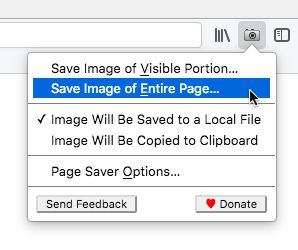
Page Saver WE lets you capture images of web pages and save them to a file in PNG or JPEG format, or to the system clipboard. Using Page Saver, you can capture a web page screenshot of an entire page or just the visible portion. To allow you to control the image capture process, a variety of options are provided including a file name pattern and support for an optional header and footer.
To begin using Page Saver WE, click the camera icon on your Firefox toolbar or press Alt+Shift+I (Linux and Windows) or ⌘+Shift+I (macOS).
Please Note: Due to restrictions Firefox imposes on extensions, Page Saver WE cannot capture images of internal Firefox pages such as about:addons or Mozilla hosted pages such as https://addons.mozilla.org/.
Questions? Contact the developers by sending email to support@pearlcrescent.com
To begin using Page Saver WE, click the camera icon on your Firefox toolbar or press Alt+Shift+I (Linux and Windows) or ⌘+Shift+I (macOS).
Please Note: Due to restrictions Firefox imposes on extensions, Page Saver WE cannot capture images of internal Firefox pages such as about:addons or Mozilla hosted pages such as https://addons.mozilla.org/.
Questions? Contact the developers by sending email to support@pearlcrescent.com
امتیاز ۴٫۴ توسط ۹۰ بررسیکننده
دسترسیها و دادهها
دسترسیهای الزامی:
- وارد کردن دادهها به کلیپبورد
- بارگیری پروندهها و خواندن و ویرایش تاریخچهٔ دانلود مرورگر
- دسترسی به دادههای شما در همهٔ وبسایتها
اطلاعات بیشتر
- پیوندهای افزونه
- نسخه
- 0.8.2
- اندازه
- ۱۰۳٫۲۸ کیلوبایت
- آخرین بهروزرسانی
- ۴ سال پیش (۲۷ ژوئیه ۲۰۲۲)
- دستهبندیهای مرتبط
- تاریخچهٔ نسخهها
- افزودن به مجموعه
توسعه دهندهگان این افزونه از شما درخواست میکنند که به ادامه یافتن توسعهی آن با یک مشارکت کوچک کمک کنید.