
osuWebCollections Shaddy توسط
Manage local collections for game osu! from within your browser right on the beatmap page.
فرادادهٔ افزونه
تصاویر صفحه

دربارهٔ این افزونه
# osuWebCollections
Browser collection manager for rhythm game [osu!](https://osu.ppy.sh).
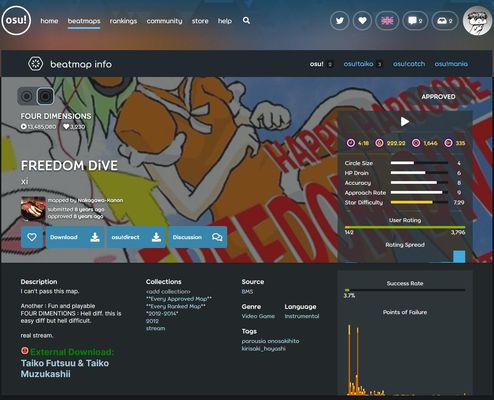
Allows you to add or remove beatmaps from your local collections file from the osu website.
### Beatmap Downloading
If the beatmap isn't currently in Songs folder, trying to add it to a collection will start the download process if you're logged in.
After it's downloaded, it will automatically be added to your Songs folder.
You can now add it to collections like normal.
**Note that it currently gives no further indication of this process taking place.**
**Trying to add it again will trigger multiple downloads.**
**To check if it's downloading, look at your downloads.**
**Note that if you installed a map through this extension, it will only be added properly once you've started osu! at least once after the download.**
**Otherwise, if you restart your browser and try to manage the map through this extension, it will not detect it and try to download it again.**
## Install
Requires osu to be installed on the same machine and can only modify the local collections.
1. Download, extract and place the windows client somewhere
2. Run installFirefox.bat
- If you move this installation, you have to redo this step
3. Install the [Browser Extension](https://addons.mozilla.org/en-US/firefox/addon/osuwebcollections/)
4. Set your osu! folder in the extension
Now the Collections section should appear on beatmap pages.
If it's stuck at `loading...` or doesn't show up at all, you may try to reload.
**Note that for the extension to work properly, osu may not be running while any changes to the collections are made.**
Browser collection manager for rhythm game [osu!](https://osu.ppy.sh).
Allows you to add or remove beatmaps from your local collections file from the osu website.
### Beatmap Downloading
If the beatmap isn't currently in Songs folder, trying to add it to a collection will start the download process if you're logged in.
After it's downloaded, it will automatically be added to your Songs folder.
You can now add it to collections like normal.
**Note that it currently gives no further indication of this process taking place.**
**Trying to add it again will trigger multiple downloads.**
**To check if it's downloading, look at your downloads.**
**Note that if you installed a map through this extension, it will only be added properly once you've started osu! at least once after the download.**
**Otherwise, if you restart your browser and try to manage the map through this extension, it will not detect it and try to download it again.**
## Install
Requires osu to be installed on the same machine and can only modify the local collections.
1. Download, extract and place the windows client somewhere
2. Run installFirefox.bat
- If you move this installation, you have to redo this step
3. Install the [Browser Extension](https://addons.mozilla.org/en-US/firefox/addon/osuwebcollections/)
4. Set your osu! folder in the extension
Now the Collections section should appear on beatmap pages.
If it's stuck at `loading...` or doesn't show up at all, you may try to reload.
**Note that for the extension to work properly, osu may not be running while any changes to the collections are made.**
امتیاز ۰ توسط ۱ بررسیکننده
دسترسیها و دادهها
دسترسیهای الزامی:
- تبادل پیام با برنامههایی غیر از فایرفاکس
- بارگیری پروندهها و خواندن و ویرایش تاریخچهٔ دانلود مرورگر
- دسترسی به زبانههای مرورگر
- دسترسی به دادههای شما برای osu.ppy.sh
اطلاعات بیشتر
- پیوندهای افزونه
- نسخه
- 0.1
- اندازه
- ۱۴٫۶۳ کیلوبایت
- آخرین بهروزرسانی
- ۶ سال پیش (۹ آوریل ۲۰۲۰)
- دستهبندیهای مرتبط
- مجوز
- مجوز MIT
- تاریخچهٔ نسخهها
- افزودن به مجموعه