Omnibookmarks binarynate توسط
Omnibookmarks is the fastest way to save and open bookmarks. Just type a keyword into the address bar to quickly open or add a bookmark.
بدون کاربربدون کاربر
فرادادهٔ افزونه
تصاویر صفحه
دربارهٔ این افزونه
Omnibookmarks is the fastest way to save and open bookmarks. Just type a keyword into the address bar to quickly open or add a bookmark.
Benefits:
⚡️ Lightning fast
📖 Saves to the browser's built-in bookmarks folder
🔐 Open source, with simple source code that is easy to audit and trust
Usage:
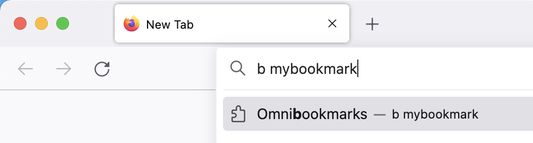
• First, activate Omnibookmarks by typing the letter "b" into the address bar, followed by a space.
• Next, you can add, open, or remove a bookmark by typing a keyword into the address bar. To add a bookmark for the current page, type "+" followed by the keyword you want to assign it, and press Enter.
• To open a bookmark you previously added, type its keyword and press Enter.
• To remove a bookmark you previously added, type "-" followed by its keyword, and press Enter:
• Omnibookmarks saves pages to a bookmarks folder named "Omnibookmarks". This folder is placed in "Other Bookmarks" by default, but you can move it to a different location if you want.
Benefits:
⚡️ Lightning fast
📖 Saves to the browser's built-in bookmarks folder
🔐 Open source, with simple source code that is easy to audit and trust
Usage:
• First, activate Omnibookmarks by typing the letter "b" into the address bar, followed by a space.
• Next, you can add, open, or remove a bookmark by typing a keyword into the address bar. To add a bookmark for the current page, type "+" followed by the keyword you want to assign it, and press Enter.
• To open a bookmark you previously added, type its keyword and press Enter.
• To remove a bookmark you previously added, type "-" followed by its keyword, and press Enter:
• Omnibookmarks saves pages to a bookmarks folder named "Omnibookmarks". This folder is placed in "Other Bookmarks" by default, but you can move it to a different location if you want.
امتیاز ۰ توسط ۱ بررسیکننده
دسترسیها و دادهها
دسترسیهای الزامی:
- خواندن و تغییر نشانکها
- نمایش اعلانها به شما
- دسترسی به زبانههای مرورگر
اطلاعات بیشتر
- پیوندهای افزونه
- نسخه
- 1.0
- اندازه
- ۲۵٫۳۴ کیلوبایت
- آخرین بهروزرسانی
- ۵ سال پیش (۷ مارس ۲۰۲۲)
- مجوز
- مجوز MIT
- تاریخچهٔ نسخهها
- افزودن به مجموعه