
Webcollect wjjsoft توسط
Capture webpages from Mozilla Firefox and save with Mybase Desktop 7/8
۲۱۳ کاربر۲۱۳ کاربر
فرادادهٔ افزونه
تصاویر صفحه

دربارهٔ این افزونه
Webcollect for Mozilla Firefox
==========================
Introduction
Webcollect is a web browser extension for capturing webpages with ease. Captured contents can be put into system clipboard, or directly saved with Mybase Desktop without having to first save as HTML files and then insert them manually.
Benefits and advantages
Webcollect allows you to capture whole or portion of webpage from within web browsers and save into Mybase databases with one click for offline perusing or archiving;
Webcollect also allows you to copy whole or portion of webage into system clipboard, then you can paste elsewhere you see fit; Unlike the default copy operation of web browsers, that usually copies only original HTML text with no image data; Webcollect tries to capture whole webpage with all stylesheets and images preserved;
Stylesheets, images and HTML text will be saved in a single .html file, that helps keep databases and file system uncluttered;
Key features
Ability to capture: selection if any, or section/article/main blocks if present, or entire webpage if no selection;
Applied CSS stylesheet can be preserved;
Linked images can be captured and embedded into HTML source;
Background images in CSS can be captured as well;
Captured contents can be put into system clipboard;
Captured contents can be directly sent to Mybase Desktop 7/8 for offline storing;
Captured contents will show page titles, timestamp and URLs of original websites;
With well-designed websites, ad banners and/or sidebars can automatically be excluded while capturing whole webpage;
Support of .webp image format, which can be converted into .png for back-compatibility with Mybase Desktop 7.x;
Works well with original websites with CORS policy fully complied;
Two capture modes: [copy] and [clone] mode, that helps keep the extension functioning in different circumstances;
Intuitive log window for displaying detailed info and progress of operations;
Available for Google Chrome and Mozilla Firefox on Linux, MacOSX and Windows;
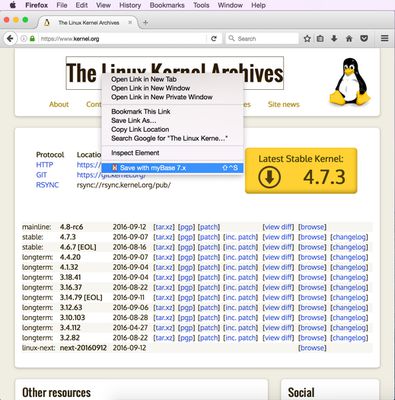
Usage is simple; To save a webpage, just one click on tool button, or use context menu, or simply press Alt+Shift+S; To copy, press Alt+Shift+C, instead of the default Ctrl/Command+C.
Installation
To install the Webcollect addon and get it to work with Mybase Desktop 7/8, please be sure first to select the [Tools - Install webcollect host for Chrome/Firefox] menu item, and then follow the instructions and preceed to the Chrome Webstore or Mozilla Addons website.
Usage
Once the extension is properly installed within your web browser, it'll be added into both the context menu and top tool bar. The usage is simple; To save a webpage, just one click on the tool button, or use the context menu, or simply press Alt+Shift+S; To copy, press Alt+Shift+C, instead of the default Ctrl/Command+C.
Notes
To copy contents: Right-click in a webpage, and then select the [Copy Html + Images] menu item; Or just press Alt+Shift+C; The captured contents will be copied to system clipboard;
To save contents with Mybase Desktop 7/8: Right-click in a webpage, and then select the [Save with Mybase] menu item; Or simply click the tool button; Or just press Alt+Shift+S; The captured contents will be sent to Mybase Desktop and saved with in the currently working database, so please make sure first to open a database before capturing web contents;
To capture portion of a webpage, make sure first to highlight the portion by mouse;
To capture whole webpage, no need to highlight any portions, Webcollect will automatically capture section/article/main blocks if present, this could exclude ad banners and sidebars from in captured HTML contents. If no section/article/main blocks present, the entire webpage will automatically be chosen;
In the case that you'd need to capture entire webpage including ad banners and/or sidebars if any, just highlight all contents in the webpage by selecting [Edit - Select all] menu item or press Ctrl/Command+A before capturing. Note that banners and sidebars usually use complicated scripts, tricks and/or advanced layout settings, that may not fully be captured and could make a mess of layout in the captured contents.
For more info, please visit:
http://www.wjjsoft.com/mybase.html
http://www.wjjsoft.com/webcollect.html
==========================
Introduction
Webcollect is a web browser extension for capturing webpages with ease. Captured contents can be put into system clipboard, or directly saved with Mybase Desktop without having to first save as HTML files and then insert them manually.
Benefits and advantages
Webcollect allows you to capture whole or portion of webpage from within web browsers and save into Mybase databases with one click for offline perusing or archiving;
Webcollect also allows you to copy whole or portion of webage into system clipboard, then you can paste elsewhere you see fit; Unlike the default copy operation of web browsers, that usually copies only original HTML text with no image data; Webcollect tries to capture whole webpage with all stylesheets and images preserved;
Stylesheets, images and HTML text will be saved in a single .html file, that helps keep databases and file system uncluttered;
Key features
Ability to capture: selection if any, or section/article/main blocks if present, or entire webpage if no selection;
Applied CSS stylesheet can be preserved;
Linked images can be captured and embedded into HTML source;
Background images in CSS can be captured as well;
Captured contents can be put into system clipboard;
Captured contents can be directly sent to Mybase Desktop 7/8 for offline storing;
Captured contents will show page titles, timestamp and URLs of original websites;
With well-designed websites, ad banners and/or sidebars can automatically be excluded while capturing whole webpage;
Support of .webp image format, which can be converted into .png for back-compatibility with Mybase Desktop 7.x;
Works well with original websites with CORS policy fully complied;
Two capture modes: [copy] and [clone] mode, that helps keep the extension functioning in different circumstances;
Intuitive log window for displaying detailed info and progress of operations;
Available for Google Chrome and Mozilla Firefox on Linux, MacOSX and Windows;
Usage is simple; To save a webpage, just one click on tool button, or use context menu, or simply press Alt+Shift+S; To copy, press Alt+Shift+C, instead of the default Ctrl/Command+C.
Installation
To install the Webcollect addon and get it to work with Mybase Desktop 7/8, please be sure first to select the [Tools - Install webcollect host for Chrome/Firefox] menu item, and then follow the instructions and preceed to the Chrome Webstore or Mozilla Addons website.
Usage
Once the extension is properly installed within your web browser, it'll be added into both the context menu and top tool bar. The usage is simple; To save a webpage, just one click on the tool button, or use the context menu, or simply press Alt+Shift+S; To copy, press Alt+Shift+C, instead of the default Ctrl/Command+C.
Notes
To copy contents: Right-click in a webpage, and then select the [Copy Html + Images] menu item; Or just press Alt+Shift+C; The captured contents will be copied to system clipboard;
To save contents with Mybase Desktop 7/8: Right-click in a webpage, and then select the [Save with Mybase] menu item; Or simply click the tool button; Or just press Alt+Shift+S; The captured contents will be sent to Mybase Desktop and saved with in the currently working database, so please make sure first to open a database before capturing web contents;
To capture portion of a webpage, make sure first to highlight the portion by mouse;
To capture whole webpage, no need to highlight any portions, Webcollect will automatically capture section/article/main blocks if present, this could exclude ad banners and sidebars from in captured HTML contents. If no section/article/main blocks present, the entire webpage will automatically be chosen;
In the case that you'd need to capture entire webpage including ad banners and/or sidebars if any, just highlight all contents in the webpage by selecting [Edit - Select all] menu item or press Ctrl/Command+A before capturing. Note that banners and sidebars usually use complicated scripts, tricks and/or advanced layout settings, that may not fully be captured and could make a mess of layout in the captured contents.
For more info, please visit:
http://www.wjjsoft.com/mybase.html
http://www.wjjsoft.com/webcollect.html
امتیاز ۴٫۱ توسط ۷ بررسیکننده
دسترسیها و دادهها
دسترسیهای الزامی:
- تبادل پیام با برنامههایی غیر از فایرفاکس
- دریافت دادهها از کلیپبورد
- وارد کردن دادهها به کلیپبورد
- دسترسی به دادههای شما در همهٔ وبسایتها
اطلاعات بیشتر
- پیوندهای افزونه
- نسخه
- 8.0
- اندازه
- ۴۸٫۲۴ کیلوبایت
- آخرین بهروزرسانی
- ۷ سال پیش (۱۳ ژانویه ۲۰۲۰)
- دستهبندیهای مرتبط
- مجوز
- تمامی حقوق محفوظ است
- تاریخچهٔ نسخهها
- افزودن به مجموعه