
My Hours Time tracker My Hours توسط
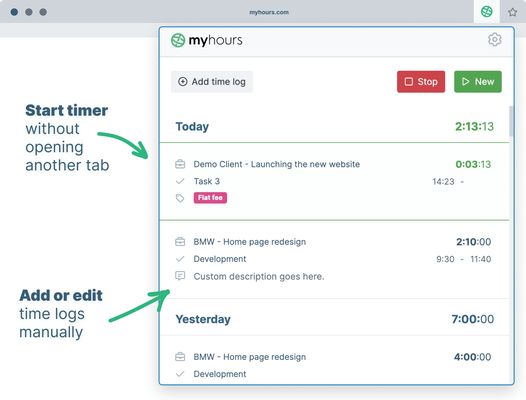
Track time without the need for opening another tab. Start timer or enter time manually right from the browser extension.
۱۳ کاربر۱۳ کاربر
فرادادهٔ افزونه
تصاویر صفحه

دربارهٔ این افزونه
Track time without the need for opening another tab. Start timer or enter time manually right from the browser extension.
### Time tracking for teams
Track time without the need for opening another tab. Start timer or enter time manually right from the browser extension.
1. Setup your My Hours account
Sign up for My Hours account on myhours.com.
Create Projects, Tasks and Clients and invite your Team members to track time.
2. Download extension
Download Firefox extension from this page.
3. Sign in into your account
Each team member logs in with the same email and password they used in the web app.
4. Track time on projects & tasks
Select from a list of pre-assigned clients, project and tasks. Optionally add tags or custom description and enter time.
5. Start the timer or enter time manually
Start and stop the running stopwatch without opening another browser tab. Edit your time logs at any time.
6. Generate reports for clients or managers
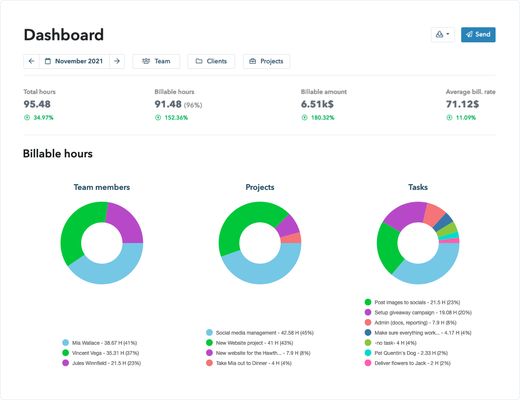
Finally go to myhours.com web app to create professional-looking reports for your clients or managers. Select from available reports and customize it based on your needs. Download to PDF or export to XLS.
For all questions reach out to support@myhours.com
### Time tracking for teams
Track time without the need for opening another tab. Start timer or enter time manually right from the browser extension.
1. Setup your My Hours account
Sign up for My Hours account on myhours.com.
Create Projects, Tasks and Clients and invite your Team members to track time.
2. Download extension
Download Firefox extension from this page.
3. Sign in into your account
Each team member logs in with the same email and password they used in the web app.
4. Track time on projects & tasks
Select from a list of pre-assigned clients, project and tasks. Optionally add tags or custom description and enter time.
5. Start the timer or enter time manually
Start and stop the running stopwatch without opening another browser tab. Edit your time logs at any time.
6. Generate reports for clients or managers
Finally go to myhours.com web app to create professional-looking reports for your clients or managers. Select from available reports and customize it based on your needs. Download to PDF or export to XLS.
For all questions reach out to support@myhours.com
امتیاز ۰ توسط ۱ بررسیکننده
دسترسیها و دادهها
دسترسیهای الزامی:
- دسترسی به زبانههای مرورگر
- دسترسی به دادههای شما برای سایتهای دامنه monday.com
- دسترسی به دادههای شما برای سایتهای دامنه basecamp.com
- دسترسی به دادههای شما برای api2.myhours.com
- دسترسی به دادههای شما برای login.myhours.com
- دسترسی به دادههای شما برای app.clickup.com
- دسترسی به دادههای شما برای app.asana.com
اطلاعات بیشتر
- پیوندهای افزونه
- نسخه
- 1.4.8
- اندازه
- ۲٫۹۲ مگابایت
- آخرین بهروزرسانی
- ۲ سال پیش (۱۹ دسامبر ۲۰۲۴)
- دستهبندیهای مرتبط
- مجوز
- تمامی حقوق محفوظ است
- خطمشی رازداری
- خطمشی رازداری این افزونه را مطالعه کنید
- تاریخچهٔ نسخهها
- افزودن به مجموعه