
Multiple Tab Handler Piro (piro_or) توسط
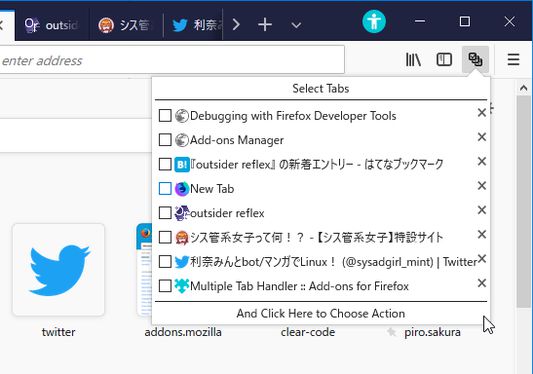
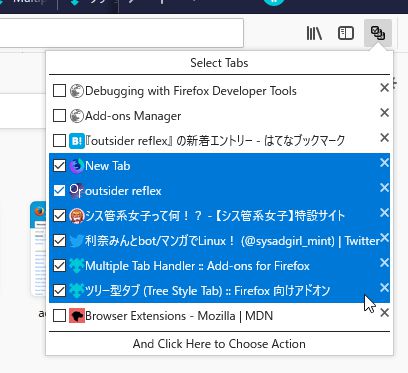
Allows you to select tabs by dragging and do something.
۲٬۵۶۰ کاربر۲٬۵۶۰ کاربر
فرادادهٔ افزونه
تصاویر صفحه


دربارهٔ این افزونه
This addon provides a panel to select tabs by dragging. After selection you can choose a command to operate selected tabs with a menu. And you can also close multiple tabs directly by dragging on closeboxes.
The menu contains commands compatible to tab context menu of Firefox itself. You can add more commands provided by other tab related addons, for example:
* Copy Selected Tabs to Clipboard
* Save Selected Tabs to Files
* Tab Mover
Moreover, this addon is designed to work with Tree Style Tab. If you install both addons, you can select tabs in the sidebar by dragging . (Note that you need to long-press on a tab to start selection. Otherwise - if you start dragging immediately, it just moves the tab.)
The menu contains commands compatible to tab context menu of Firefox itself. You can add more commands provided by other tab related addons, for example:
* Copy Selected Tabs to Clipboard
* Save Selected Tabs to Files
* Tab Mover
Moreover, this addon is designed to work with Tree Style Tab. If you install both addons, you can select tabs in the sidebar by dragging . (Note that you need to long-press on a tab to start selection. Otherwise - if you start dragging immediately, it just moves the tab.)
امتیاز ۳٫۷ توسط ۱۲۲ بررسیکننده
دسترسیها و دادهها
دسترسیهای الزامی:
- نمایش اعلانها به شما
- دسترسی به زبانههای مرورگر
دسترسیهای اختیاری:
- خواندن و تغییر نشانکها
- خواندن و تغییر تنظیمات مرورگر
- دسترسی به دادههای شما در همهٔ وبسایتها
اطلاعات بیشتر
- پیوندهای افزونه
- نسخه
- 3.2.5
- اندازه
- ۱۳۲٫۰۸ کیلوبایت
- آخرین بهروزرسانی
- ۲ ماه پیش (۲۷ اوت ۲۰۲۶)
- خطمشی رازداری
- خطمشی رازداری این افزونه را مطالعه کنید
- تاریخچهٔ نسخهها
- افزودن به مجموعه
For addon authors, Multiple Tab Handler provides public API. If your addon provides something special feature, you can add new menu item to the command list for selected tabs via API. For more details, see the API document.