
Firefox Multi-Account Containers Firefox توسط
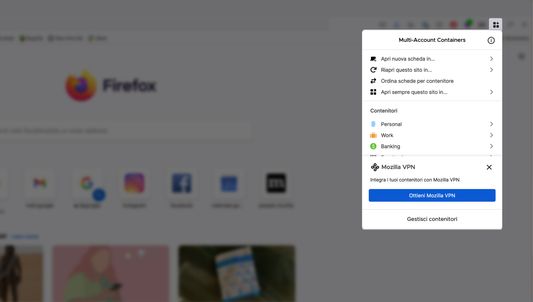
Firefox Multi-Account Containers lets you keep parts of your online life separated into color-coded tabs. Cookies are separated by container, allowing you to use the web with multiple accounts and integrate Mozilla VPN for an extra layer of privacy.
فرادادهٔ افزونه
تصاویر صفحه


دربارهٔ این افزونه
About This Extension
The Firefox Multi-Account Containers extension lets you carve out a separate box for each of your online lives – no more opening a different browser just to check your work email!
Under the hood, it separates website storage into tab-specific Containers. Cookies downloaded by one Container are not available to other Containers. You can even integrate individual Containers with Mozilla VPN to protect your browsing and location. With the Firefox Multi-Account Containers extension, you can...
After installing the Firefox Multi-Account Containers extension, click the Containers icon to edit your Containers. Change their colors, names, and icons. Long-click the new tab button to open a new Container tab.
For more information on how to use Multi-Account Containers, visit our help articles:
All about Multi Account Containers
Multi Container user - how to use Mozilla VPN
VPN subscriber - how to use Multi Account Containers
The Firefox Multi-Account Containers extension lets you carve out a separate box for each of your online lives – no more opening a different browser just to check your work email!
Under the hood, it separates website storage into tab-specific Containers. Cookies downloaded by one Container are not available to other Containers. You can even integrate individual Containers with Mozilla VPN to protect your browsing and location. With the Firefox Multi-Account Containers extension, you can...
- Sign in to two different accounts on the same site (for example, you could sign in to work email and home email in two different Container tabs.
- Keep different kinds of browsing far away from each other (for example, you might use one Container tab for managing your Checking Account and a different Container tab for searching for new songs by your favorite band)
- Avoid leaving social-network footprints all over the web (for example, you could use a Container tab for signing in to a social network, and use a different tab for visiting online news sites, keeping your social identity separate from tracking scripts on news sites)
- Protect your browsing activity in individual Containers using Mozilla VPN, so you can shop while travelling abroad but check your bank account from a server in your home country.
After installing the Firefox Multi-Account Containers extension, click the Containers icon to edit your Containers. Change their colors, names, and icons. Long-click the new tab button to open a new Container tab.
For more information on how to use Multi-Account Containers, visit our help articles:
All about Multi Account Containers
Multi Container user - how to use Mozilla VPN
VPN subscriber - how to use Multi Account Containers
امتیاز ۴٫۶ توسط ۸٬۰۷۵ بررسیکننده
دسترسیها و دادهها
دسترسیهای الزامی:
- دسترسی به تاریخچه مرور
- نظارت بر استفاده از افزونه و مدیریت پوستهها
- دسترسی به زبانههای مرورگر
- دسترسی به دادههای شما در همهٔ وبسایتها
دسترسیهای اختیاری:
- تبادل پیام با برنامههایی غیر از فایرفاکس
- خواندن و تغییر نشانکها
- پاکسازی تاریخچهٔ مرور اخیر، کوکیها و دادههای وابسته
- کنترل تنظیمات پروکسی مرورگر
جمعآوری دادهها:
- به گفته توسعهدهنده، این افزونه نیازی به جمعآوری دادهها ندارد.
اطلاعات بیشتر
- پیوندهای افزونه
- نسخه
- 8.3.8
- اندازه
- ۹۰۴٫۶ کیلوبایت
- آخرین بهروزرسانی
- ۴ ماه پیش (۲۴ ژوئن ۲۰۲۶)
- دستهبندیهای مرتبط
- تاریخچهٔ نسخهها
- افزودن به مجموعه