Mantis Helper Michael Fiedler توسط
Mantis Helper is a browser extension that streamlines your bug tracking workflow. Select an issue number on any webpage, right-click, and choose 'Open in Mantis' to view it in a new tab. Customizable Mantis URL via options UI.
۱ کاربر۱ کاربر
فرادادهٔ افزونه
تصاویر صفحه
دربارهٔ این افزونه
Overview:
Mantis Helper is a browser extension that adds a contextual menu option for quickly opening issue numbers in Mantis, a popular bug tracking system. The extension aims to streamline your workflow by enabling you to navigate directly to Mantis issues from any webpage where an issue number is displayed.
Features:
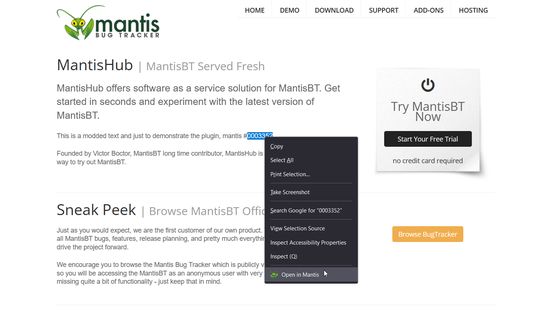
Context Menu Integration: Select a number (issue ID) on any webpage, right-click, and choose "Open in Mantis" to open the relevant issue in a new tab.
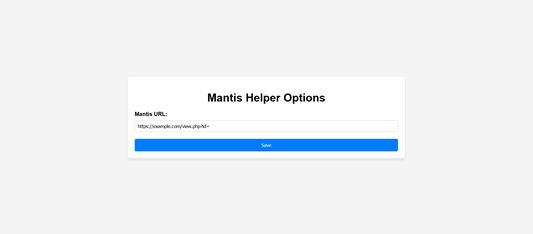
Custom Mantis URL: Configure your specific Mantis instance URL through the options UI.
Permissions
The extension requires the following permissions:
Context Menus: To add the "Open in Mantis" option to the browser's right-click menu.
Storage: To save the custom Mantis URL that you set in the options.
How to Use:
Installation: Download and install the extension.
Configuration: Go to the extension options (Settings > Extensions > Mantis Helper > Options) and input your Mantis URL if it's different from the default.
Usage: Highlight any issue number on a webpage, right-click, and select "Open in Mantis".
Mantis Helper is a browser extension that adds a contextual menu option for quickly opening issue numbers in Mantis, a popular bug tracking system. The extension aims to streamline your workflow by enabling you to navigate directly to Mantis issues from any webpage where an issue number is displayed.
Features:
Context Menu Integration: Select a number (issue ID) on any webpage, right-click, and choose "Open in Mantis" to open the relevant issue in a new tab.
Custom Mantis URL: Configure your specific Mantis instance URL through the options UI.
Permissions
The extension requires the following permissions:
Context Menus: To add the "Open in Mantis" option to the browser's right-click menu.
Storage: To save the custom Mantis URL that you set in the options.
How to Use:
Installation: Download and install the extension.
Configuration: Go to the extension options (Settings > Extensions > Mantis Helper > Options) and input your Mantis URL if it's different from the default.
Usage: Highlight any issue number on a webpage, right-click, and select "Open in Mantis".
امتیاز ۰ توسط ۱ بررسیکننده
دسترسیها و دادهها
اطلاعات بیشتر
- پیوندهای افزونه
- نسخه
- 2.0.1
- اندازه
- ۷۷٫۰۸ کیلوبایت
- آخرین بهروزرسانی
- ۱۹ روز پیش (۲۵ سپتامبر ۲۰۲۶)
- دستهبندیهای مرتبط
- مجوز
- مجوز MIT
- تاریخچهٔ نسخهها
- افزودن به مجموعه