افزونه‌های مرورگر فایرفاکس
  • افزونه‌ها
  • پوسته‌ها
    • برای فایرفاکس
    • واژه‌نامه‌ها و بسته‌های زبان
ورود
پیش‌نمایش Lightshot (screenshot tool)

Lightshot (screenshot tool) Serg at SkillBrains ،Andrej at SkillBrains توسط

Easy and convenient screenshot tool. Allows you to make screenshots of any selected area (video and flash too), edit and upload it to server.

4 (۲۰۹ بررسی)4 (۲۰۹ بررسی)
۲۵٬۹۷۹ کاربر۲۵٬۹۷۹ کاربر
فایرفاکس را دریافت کنید و افزونه را بگیرید
دریافت فایل

فرادادهٔ افزونه

تصاویر صفحه
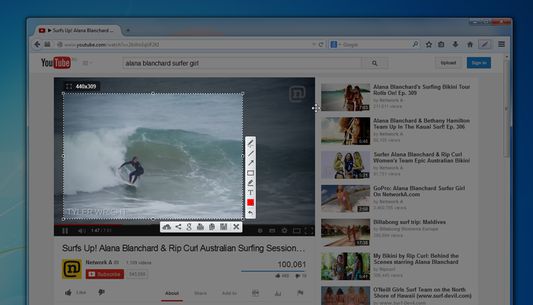
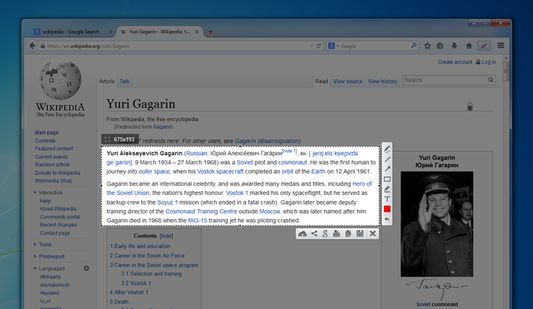
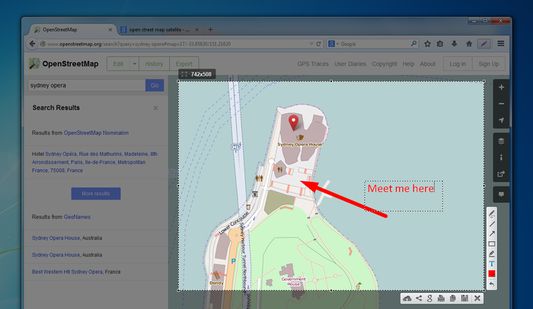
Lightshot toolbar buttonYou can take a screenshot of video/flash/javaSelect areaEdit your screenshots
دربارهٔ این افزونه
Lightshot is a tool allowing you to easily make screenshots of any selected area in a browser tab. You just hit Lightshot icon on the toolbar or status bar, then select area you want to make a screenshot from and click “Save” or “Upload to server". In case of uploading you instantly get link to a screenshot you’ve just uploaded.
It is possible to resize and move selection area right in a browser tab without opening any additional applications. That makes the process very simple and easy. You also can edit your screenshots (add text, draw lines and more other functions).
نظرات توسعه‌دهنده
Test picture: http://prntscr.com/3hjkmh

We will be adding new interesting features to make the screenshoting better and easier.

Frequently asked questions about LightShot:

Q: Can I copy screenshot to the windows clipboard?
A: Yes, you can! Just select a region for shooting and press Ctrl+C.

Q: How can I make a screenshot faster?
A: You can press Ctrl before selecting a region and the addon will copy your screenshot to the clipboard as soon as you release the mouse button.

Q: Can your addon run on Linux or Mac?
A: No, but maybe one shiny day ;)

Q: What image formats do you support?
A: Currently it is .png, .bmp, and .jpg

Q: What server do you use to host uploaded screenshots?
A: Imageshack

Q: I found some issues in LightShot. How can it be solved?
A: Please make sure you are using the latest build, and if its still there contact us on support@skillbrains.com

Q: I have something to tell you about the LightShot how can I contact you?
A: The best way is to contact us by messaging us through Facebook page or sending e-mail.

Q: What hotkeys does LightShot have?
A: Check the hotkey list page on our site to get further information.
امتیاز ۴ توسط ۲۰۹ بررسی‌کننده
وارد شوید تا به این افزونه امتیاز دهید
هنوز هیچ امتیازی ثبت نشده است

امتیاز ستاره‌ای ذخیره شد

۵
۱۳۵
۴
۱۹
۳
۹
۲
۱۱
۱
۳۵
تمام ۲۰۹ بررسی را بخوانید
دسترسی‌ها و داده‌ها

دسترسی‌های الزامی:

  • وارد کردن داده‌ها به کلیپ‌بورد
  • بارگیری پرونده‌ها و خواندن و ویرایش تاریخچهٔ دانلود مرورگر
  • نمایش اعلان‌ها به شما
  • دسترسی به زبانه‌های مرورگر
  • دسترسی به داده‌های شما در همهٔ وب‌سایت‌ها
اطلاعات بیشتر
اطلاعات بیشتر
پیوند‌های افزونه
  • صفحه نخست
  • سایت پشتیبانی
  • ایمیلٔ پشتیبانی
  • کپی شناسه افزونه
نسخه
6.2.5resigned1
اندازه
۶۹۱٫۰۶ کیلوبایت
آخرین به‌روزرسانی
۲ سال پیش (۲۵ آوریل ۲۰۲۴)
دسته‌بندی‌های مرتبط
  • عکس، موسیقی و ویدیو
  • شبکه‌های اجتماعی و ارتباطات
مجوز
Custom License
تاریخچهٔ نسخه‌ها
  • نمایش همه نسخه‌ها
افزودن به مجموعه
گزارش این افزونه
رفتن به صفحه اصلی موزیلا

افزونه‌ها

  • درباره
  • وبلاگ افزونه‌های فایرفاکس
  • کارگاه افزونه
  • مرکز توسعه‌دهندگان
  • سیاست‌های توسعه‌دهنده
  • وبلاگ انجمن
  • انجمن
  • گزارش خطا
  • راهنمای بررسی

بارگیری

  • Download Firefox
  • Windows
  • macOS
  • iOS
  • Android
  • Linux
  • All

آخرین نسخه‌های ساخت

  • Nightly
  • Beta

فایرفاکس برای کسب‌وکار

  • Enterprise

انجمن

  • Connect
  • Contribute
  • Developer

دنبال کردن

  • Instagram
  • YouTube
  • TikTok
  • Bluesky
  • Podcast
  • حریم‌خصوصی
  • کوکی‌ها
  • حقوقی

غیر از مواردی که مشخص شده، محتوای این سایت تحت گواهینامه Creative Commons Attribution Share-Alike License v3.0 یا هر نسخه بعدی خواهد بود.