Jira Exporter Picsweb توسط
Export Jira tickets to csv file from Jira board. Latest version export JIRA tickets from Active Sprints board and Backlogs . watch demo - https://youtu.be/yKbO_U2ltHU Extension sponsored by https://bestvpn.se/ Best VPN
۱ کاربر۱ کاربر
فرادادهٔ افزونه
تصاویر صفحه
دربارهٔ این افزونه
The extension export JIRA tickets from Active Sprints and Backlogs.
Latest version include copy to clipboard feature. User can copy individual ticket details to clipboard by clicking Copy button next it.
Follow this below steps to try the export option
1) Install add-on in Firefox.
2) Visit your Atlassion JIRA website . Go to active sprints or backlogs.
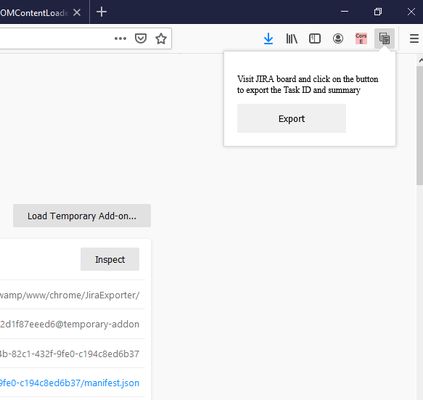
3) Click on the addon icon on top right side.
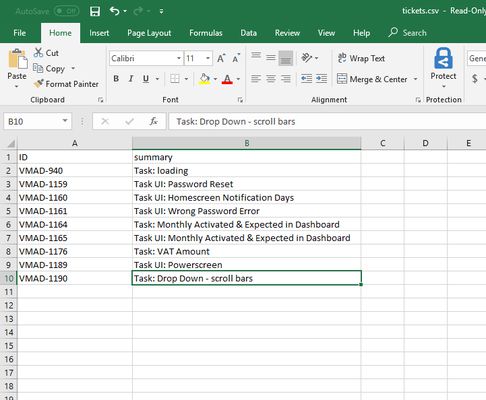
4) Click on the export button which will download csv file.
watch demo - https://youtu.be/yKbO_U2ltHU
Please share your valuable feedback. We will try to enhance this extension.
Extension sponsored by https://bestvpn.se/ Best VPN
Latest version include copy to clipboard feature. User can copy individual ticket details to clipboard by clicking Copy button next it.
Follow this below steps to try the export option
1) Install add-on in Firefox.
2) Visit your Atlassion JIRA website . Go to active sprints or backlogs.
3) Click on the addon icon on top right side.
4) Click on the export button which will download csv file.
watch demo - https://youtu.be/yKbO_U2ltHU
Please share your valuable feedback. We will try to enhance this extension.
Extension sponsored by https://bestvpn.se/ Best VPN
امتیاز ۰ توسط ۱ بررسیکننده
دسترسیها و دادهها
دسترسیهای الزامی:
- وارد کردن دادهها به کلیپبورد
- دسترسی به زبانههای مرورگر
- دسترسی به دادههای شما برای سایتهای دامنه atlassian.net
اطلاعات بیشتر
- پیوندهای افزونه
- نسخه
- 1.2.0
- اندازه
- ۲۱٫۱۱ کیلوبایت
- آخرین بهروزرسانی
- ۶ سال پیش (۲۱ مه ۲۰۲۰)
- دستهبندیهای مرتبط
- مجوز
- تمامی حقوق محفوظ است
- تاریخچهٔ نسخهها
- افزودن به مجموعه
توسعه دهنده این افزونه از شما درخواست میکند که به ادامه یافتن توسعهی آن با یک مشارکت کوچک کمک کنید.
1) Install addon in Firefox
2) Visit your Atlassion JIRA website . Go to active sprints with tickets
3) Click on the addon icon on top right side
4) Click on the export button which will download csv file