
Javascript Firewall Bill توسط
Block JavaScript of unwanted origin.
۵ کاربر۵ کاربر
فرادادهٔ افزونه
تصاویر صفحه

دربارهٔ این افزونه
This extension is intended for advanced users. Some websites will require configuration to work properly.
For each website, you can decide from which domains JavaScript is allowed.
By default, only scripts from the same domain than the website are allowed.
Interface
Limitations
The extension does not work on domains listed in the preference "extensions.webextensions.restrictedDomains", mainly Mozilla websites such as https://addons.mozilla.org
GitHub
https://github.com/billdoor1/javascript_firewall
For each website, you can decide from which domains JavaScript is allowed.
By default, only scripts from the same domain than the website are allowed.
Interface
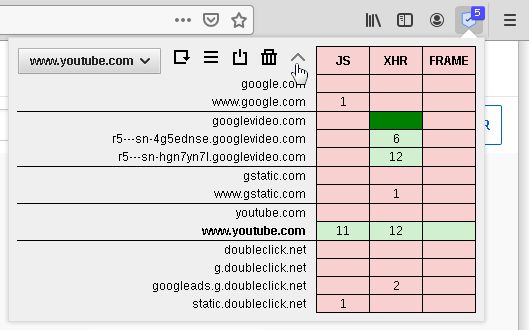
- The table shows how many requests have been blocked or allowed on the web page for each domain. Each column of the table represents a type of request:
- JS: javascript code: <script> and Workers
- XHR: data request: XMLHttpRequest, Fetch, WebSocket, Beacon, ping, and Content-Security-Policy-report
- FRAME: external content: <iframe>, <frame>, <object> and <embed>
- dark red: blocked explicitly
- light red: blocked by a more general rule
- light green: allowed by a more general rule
- dark green: allowed explicitly
- The drop-down list at the top left indicates on which websites the rules apply.
By default, a rule only applies to the website's domain and it's subdomains.
If you want to create a rule that applies to all websites, select "all websites". - The 5 buttons:
- Reload: For the new rules to take effect, the page must be reloaded.
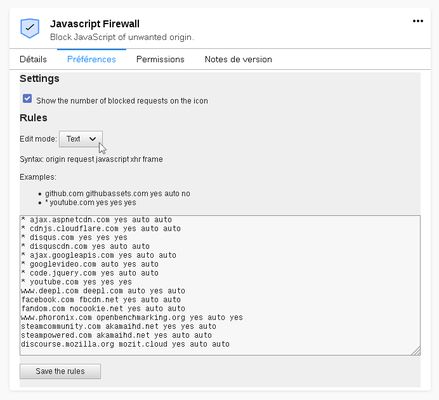
- List: Manage the settings and the rules you have created. You can use the text mode to manually edit your rules (4th screenshot)
- Disable/Enable: When disabled, the addon will not block anything for the current tab but will still count requests.
- Delete: Delete the rules you have created for the current website.
- Arrow: Display all the parent domains. It makes it possible to create a rule which will apply to all its subdomains.
- The badge on the icon shows the number of blocked requests.
- Make Youtube works (1st screenshot)
- Go to a Youtube video and click on the addon icon
- Click on the arrow button to display the parent domains
- Allow XMLHttpRequest (XHR) for googlevideo.com
- Reload the page
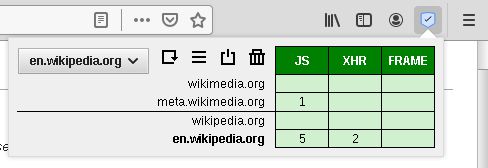
- Allow embedded YouTube videos on all websites (2nd screnshot)
- Go to a Youtube video
- Click on the arrow button to display the parent domains
- Select "all websites" in the drop-down list
- Allow JS, XHR and FRAME for www.youtube.com and XHR for googlevideo.com
- Allow everything for a website (3rd screenshot)
- Make the "JS", "XHR" and "FRAME" cells dark green
Limitations
The extension does not work on domains listed in the preference "extensions.webextensions.restrictedDomains", mainly Mozilla websites such as https://addons.mozilla.org
GitHub
https://github.com/billdoor1/javascript_firewall
امتیاز ۴٫۴ توسط ۱۶ بررسیکننده
دسترسیها و دادهها
دسترسیهای الزامی:
- دسترسی به فعالیت مرورگر در حین پیمایش
- دسترسی به دادههای شما در همهٔ وبسایتها
اطلاعات بیشتر
- پیوندهای افزونه
- نسخه
- 1.4
- اندازه
- ۱۷٫۱۵ کیلوبایت
- آخرین بهروزرسانی
- ۴ سال پیش (۱۰ مه ۲۰۲۲)
- دستهبندیهای مرتبط
- تاریخچهٔ نسخهها
- افزودن به مجموعه