افزونه‌های مرورگر فایرفاکس
  • افزونه‌ها
  • پوسته‌ها
    • برای فایرفاکس
    • واژه‌نامه‌ها و بسته‌های زبان
ورود
پیش‌نمایش HTML Tag Changer

HTML Tag Changer Kai Grunert توسط

Select HTML elements and change their tag names. You can select elements with a CSS selector and specify the intended new tag name. You can also hide or remove the elements. E.g. this can be useful to include specific elements in the Reader View.

0 (۰ بررسی)0 (۰ بررسی)
۳ کاربر۳ کاربر
فایرفاکس را دریافت کنید و افزونه را بگیرید
دریافت فایل

فرادادهٔ افزونه

تصاویر صفحه
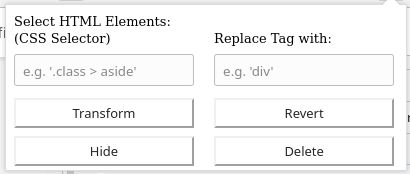
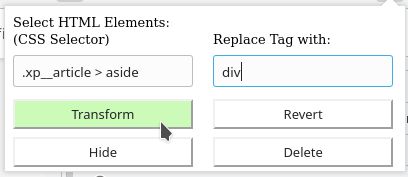
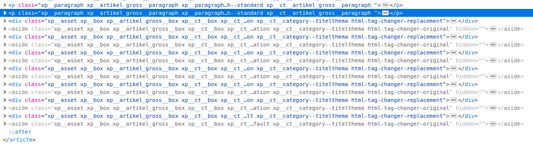
Default display if you open the add-onSelect the HTML elements with a CSS selector and type the new tag nameThe original source code before the transformationThe new source code after the transformation
دربارهٔ این افزونه
This browser add-on can change the HTML element tag names on a web page into another tag name. You can select the HTML elements that should be replaced with a CSS selector and state the new tag names.

Furthermore you can hide or delete the selected elements from the web page. The former is usually preferred, because you will be able to revert the changes afterwards. If you use delete, you need to reload the complete page to revert the changes.

Example: The Reader View of Firefox includes and presents only a selection of HTML elements like <p>. But if the web page contains important hint or content boxes in <aside> elements, you will not see them in the Reader View. You can use this add-on to change all <aside> elements in appropriate elements before you turn on the Reader.

There is a Revert button - if it doesn't work correctly, just reload the complete page.

Hints:
  • Due to a lack of API support, the event listeners for an element can not be copied into the new element
  • Pay attention to the structure of a web page: some elements (often inline elements) don't allow to include other elements. E.g. if you want to change all <aside> elements into <p> elements, this can lead to unpredictable behavior if the <aside> element contains further block elements, because <p> is not allowed to contain block elements.
  • If the replacement contains web components, this can also lead to some side effects

Details:

The add-on does not delete the original elements, but it hides them. Therefore the actions can be reverted.
امتیاز ۰ توسط ۱ بررسی‌کننده
وارد شوید تا به این افزونه امتیاز دهید
هنوز هیچ امتیازی ثبت نشده است

امتیاز ستاره‌ای ذخیره شد

۵
۰
۴
۰
۳
۰
۲
۰
۱
۰
هنوز بررسی‌ای ثبت نشده است
اطلاعات بیشتر
پیوند‌های افزونه
  • صفحه نخست
  • سایت پشتیبانی
  • کپی شناسه افزونه
نسخه
1.0
اندازه
۲۹٫۶ کیلوبایت
آخرین به‌روزرسانی
۷ سال پیش (۲ مه ۲۰۲۰)
دسته‌بندی‌های مرتبط
  • توسعه وب
  • ظاهر
مجوز
مجوز سفارشی
تاریخچهٔ نسخه‌ها
  • نمایش همه نسخه‌ها
افزودن به مجموعه
گزارش این افزونه
رفتن به صفحه اصلی موزیلا

افزونه‌ها

  • درباره
  • وبلاگ افزونه‌های فایرفاکس
  • کارگاه افزونه
  • مرکز توسعه‌دهندگان
  • سیاست‌های توسعه‌دهنده
  • وبلاگ اجتماع
  • انجمن
  • گزارش خطا
  • راهنمای بررسی

بارگیری

  • Download Firefox
  • Windows
  • macOS
  • iOS
  • Android
  • Linux
  • All

آخرین نسخه‌های ساخت

  • Nightly
  • Beta

فایرفاکس برای کسب‌وکار

  • Enterprise

اجتماع

  • Connect
  • Contribute
  • Developer

دنبال کردن

  • Instagram
  • YouTube
  • TikTok
  • Bluesky
  • Podcast
  • حریم‌خصوصی
  • کلوچک‌ها
  • حقوقی

غیر از مواردی که مشخص شده، محتوای این سایت تحت گواهینامه Creative Commons Attribution Share-Alike License v3.0 یا هر نسخه بعدی خواهد بود.