
Export Memrise Progress neoncube توسط
Export your Memrise community course's progress.
۴۸ کاربر۴۸ کاربر
فرادادهٔ افزونه
تصاویر صفحه
دربارهٔ این افزونه
This extension lets you save your Memrise community course's progress, so that you can import it into another site, such as mylittlewordland.com
To download your progress:
1. Go to https://community-courses.memrise.com
2. Open a course. You should now be on the course's overview page.
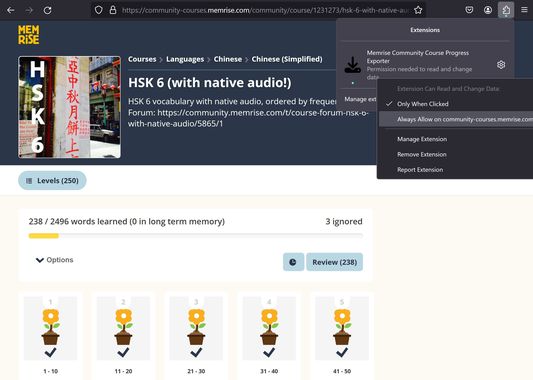
3. Click the Firefox extensions icon, right click the Memrise Community Course Progress Exporter extension, and select "Always Allow on community-courses.memrise.com" (See screenshot).
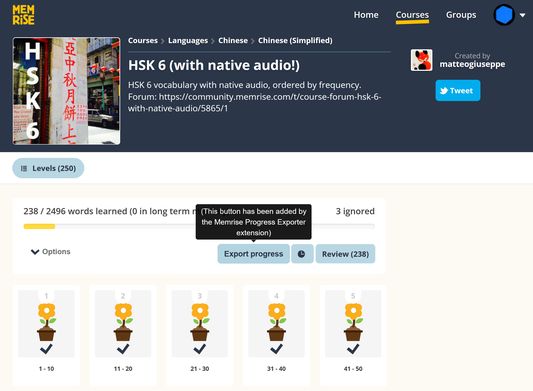
4. Click the blue "Export progress" button.
To download your progress:
1. Go to https://community-courses.memrise.com
2. Open a course. You should now be on the course's overview page.
3. Click the Firefox extensions icon, right click the Memrise Community Course Progress Exporter extension, and select "Always Allow on community-courses.memrise.com" (See screenshot).
4. Click the blue "Export progress" button.
امتیاز ۰ توسط ۱ بررسیکننده
دسترسیها و دادهها
دسترسیهای الزامی:
- دسترسی به دادههای شما برای community-courses.memrise.com
- دسترسی به دادههای شما برای app.memrise.com
دسترسیهای اختیاری:
- دسترسی به دادههای شما برای community-courses.memrise.com
- دسترسی به دادههای شما برای app.memrise.com
اطلاعات بیشتر
- پیوندهای افزونه
- نسخه
- 1.13
- اندازه
- ۲۴٫۲۱ کیلوبایت
- آخرین بهروزرسانی
- ۴ ماه پیش (۲۹ مه ۲۰۲۶)
- دستهبندیهای مرتبط
- مجوز
- تمامی حقوق محفوظ است
- تاریخچهٔ نسخهها
- افزودن به مجموعه