
Environment Marker Environment Marker توسط
Use the Environment Marker extension and prevent screw-ups with the (programming) environments.
۲۵۴ کاربر۲۵۴ کاربر
فرادادهٔ افزونه
تصاویر صفحه
دربارهٔ این افزونه
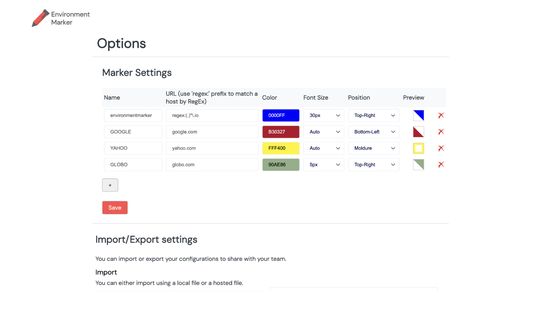
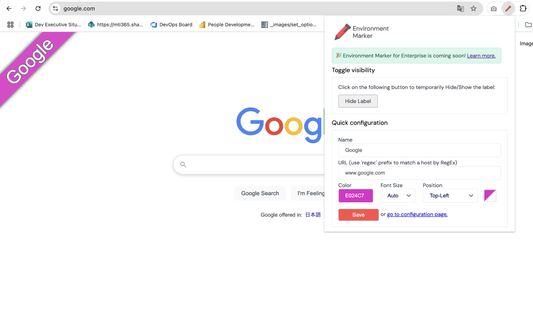
This extension helps you visually distinguish between different environments by adding a colored label to specified websites based on URL configurations. It supports regular expressions (including wildcards), a color picker, and positioning preferences.
Why Use Environment Marker?
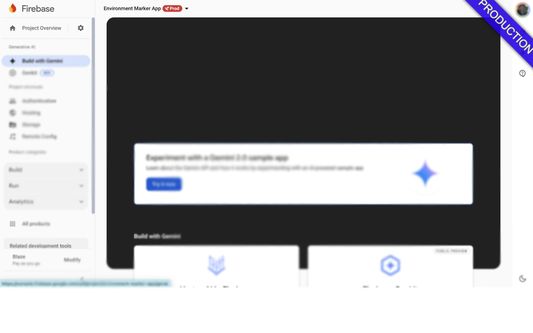
In IT projects, working with multiple environments—such as development, QA, staging, and production—is common. However, since these environments often look identical, mistakes can happen.
Have you ever intended to run a "quick test" in the development environment, only to realize too late that you were actually in production? Misconfigurations and accidental changes can easily occur because the only visible difference is the discreet URL in the browser's address bar.
That is where Environment Marker comes in. This free and open-source extension lets you define your project’s environment URLs and assign a colored label in the browser window to identify them at a glance.
No more screw-ups in the production environment!
Features:
- Customizable labels – Choose label colors with a color picker.
- Regular expression support – Use regex patterns to match URLs dynamically.
- Flexible label positioning – Place the label in any corner: Top-right, Top-left, Bottom-right, Bottom-left or Moldure.
- Quick Config mode – A fast and easy setup option.
- Export & Import settings – Backup and restore configurations effortlessly.
Latest Release – v1.2.1
Important: Before updating, export your settings for backup.
What’s New?
✔ Minor bug fixes.
✔ Added support for ribbon transparency.
Environment Marker is open-source, and contributions are welcome!
GitHub: https://github.com/geovanneb/envmarker
https://www.youtube.com/watch?v=EQR__eJkLUw
Why Use Environment Marker?
In IT projects, working with multiple environments—such as development, QA, staging, and production—is common. However, since these environments often look identical, mistakes can happen.
Have you ever intended to run a "quick test" in the development environment, only to realize too late that you were actually in production? Misconfigurations and accidental changes can easily occur because the only visible difference is the discreet URL in the browser's address bar.
That is where Environment Marker comes in. This free and open-source extension lets you define your project’s environment URLs and assign a colored label in the browser window to identify them at a glance.
No more screw-ups in the production environment!
Features:
- Customizable labels – Choose label colors with a color picker.
- Regular expression support – Use regex patterns to match URLs dynamically.
- Flexible label positioning – Place the label in any corner: Top-right, Top-left, Bottom-right, Bottom-left or Moldure.
- Quick Config mode – A fast and easy setup option.
- Export & Import settings – Backup and restore configurations effortlessly.
Latest Release – v1.2.1
Important: Before updating, export your settings for backup.
What’s New?
✔ Minor bug fixes.
✔ Added support for ribbon transparency.
Environment Marker is open-source, and contributions are welcome!
GitHub: https://github.com/geovanneb/envmarker
https://www.youtube.com/watch?v=EQR__eJkLUw
امتیاز ۵ توسط ۱ بررسیکننده
دسترسیها و دادهها
دسترسیهای الزامی:
- دسترسی به دادههای شما در همهٔ وبسایتها
دسترسیهای اختیاری:
- دسترسی به دادههای شما در همهٔ وبسایتها
اطلاعات بیشتر
- پیوندهای افزونه
- نسخه
- 1.2.1
- اندازه
- ۱۶۰٫۰۷ کیلوبایت
- آخرین بهروزرسانی
- ۲ سال پیش (۸ مارس ۲۰۲۵)
- مجوز
- مجوز MIT
- خطمشی رازداری
- خطمشی رازداری این افزونه را مطالعه کنید
- تاریخچهٔ نسخهها
- برچسبها
- افزودن به مجموعه
توسعه دهنده این افزونه از شما درخواست میکند که به ادامه یافتن توسعهی آن با یک مشارکت کوچک کمک کنید.