Edit with Notepad++ Joe Ertaba توسط
Edit an HTML element and all its child nodes in Notepad++ Text editor with real-time updates
۱۰۷ کاربر۱۰۷ کاربر
فرادادهٔ افزونه
تصاویر صفحه
دربارهٔ این افزونه
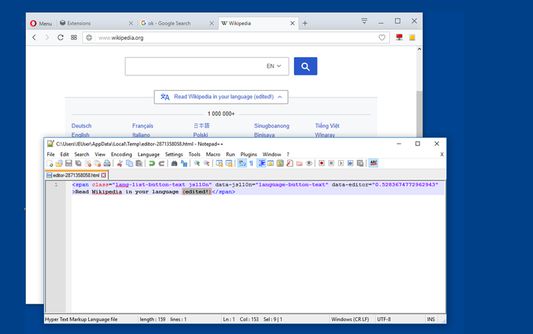
With this extension, the content of an HTML node element and all its child nodes can be edited in well-known Nodepad++ editor with real-time updates.
To start a new editing instance, click on the toolbar button once and drag the mouse button inside the page. You will get the inspection box similar to the built-in inspector. Left-click saves the content in a temporary directory and opens the Notepad++ editor. Once the content is changed press the save button for automatic update. On Chrome browser, you can also open a new instance using the developer tools. Switch to the inspect tab, select the desired element and in the right-panel, click on the "Edit with Notepad++" panel.
Note: You can edit multiple nodes simultaneously with this extension
Note: Files are stored in the OS temporary directory, so there is no need to delete them manually
For more info please visit:
http://add0n.com/edit-as-html.html
For bug reports use:
https://github.com/belaviyo/edit-as-html/issues
Video Tutorials:
Windows: https://youtu.be/xX-j-HQ8WJI
Linux and Mac: https://youtu.be/8r756Z3wQ8M
To start a new editing instance, click on the toolbar button once and drag the mouse button inside the page. You will get the inspection box similar to the built-in inspector. Left-click saves the content in a temporary directory and opens the Notepad++ editor. Once the content is changed press the save button for automatic update. On Chrome browser, you can also open a new instance using the developer tools. Switch to the inspect tab, select the desired element and in the right-panel, click on the "Edit with Notepad++" panel.
Note: You can edit multiple nodes simultaneously with this extension
Note: Files are stored in the OS temporary directory, so there is no need to delete them manually
For more info please visit:
http://add0n.com/edit-as-html.html
For bug reports use:
https://github.com/belaviyo/edit-as-html/issues
Video Tutorials:
Windows: https://youtu.be/xX-j-HQ8WJI
Linux and Mac: https://youtu.be/8r756Z3wQ8M
امتیاز ۳٫۲ توسط ۵ بررسیکننده
دسترسیها و دادهها
دسترسیهای الزامی:
- تبادل پیام با برنامههایی غیر از فایرفاکس
- بارگیری پروندهها و خواندن و ویرایش تاریخچهٔ دانلود مرورگر
- نمایش اعلانها به شما
- دسترسی به زبانههای مرورگر
- دسترسی به دادههای شما در همهٔ وبسایتها
اطلاعات بیشتر
- پیوندهای افزونه
- نسخه
- 0.1.3
- اندازه
- ۴۴٫۹۲ کیلوبایت
- آخرین بهروزرسانی
- ۷ سال پیش (۷ اکتبر ۲۰۱۹)
- خطمشی رازداری
- خطمشی رازداری این افزونه را مطالعه کنید
- تاریخچهٔ نسخهها
- افزودن به مجموعه
توسعه دهنده این افزونه از شما درخواست میکند که به ادامه یافتن توسعهی آن با یک مشارکت کوچک کمک کنید.