
CSS Insight MarkAlexI توسط
CSS Insight – your go-to solution for fast and efficient style management directly in your browser!
در فایرفاکس برای Android™ موجود استدر فایرفاکس برای Android™ موجود است
۶۳ کاربر۶۳ کاربر
برای باز کردن این افزونه در فایرفاکس اندروید، کد QR را اسکن کنید

فرادادهٔ افزونه
تصاویر صفحه

دربارهٔ این افزونه
CSS Insight – Effortless CSS Styling, Right at Your Fingertips
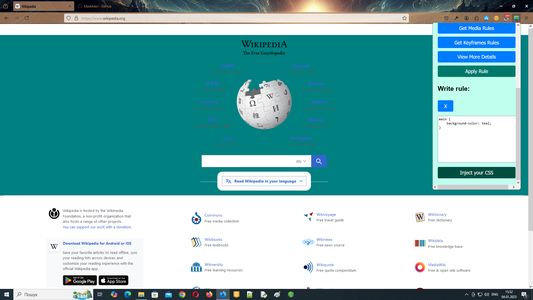
CSS Insight is the ultimate browser extension for web developers looking to streamline their styling workflow. Instantly inspect styles directly on any webpage — no need to open the browser console.
With CSS Insight, you can:
Whether you're debugging, optimizing, or simply exploring how a page is built, CSS Insight gives you everything you need to manage and understand styles efficiently.
Take control of your CSS – faster, smarter, cleaner.
NOTICE
Tracking an Element with CSS Insight
To track and analyze a specific element on a webpage:
Additionally, you can manually enter any valid CSS selector into the input field to analyze styles for that element.
CSS Insight is the ultimate browser extension for web developers looking to streamline their styling workflow. Instantly inspect styles directly on any webpage — no need to open the browser console.
With CSS Insight, you can:
- View declared styles, computed styles, media rules, and keyframe animations
- Copy CSS rules to your clipboard with a single click
- Track and analyze any HTML element with real-time style info
- Add custom styles to test design changes on the fly
- Explore styles in a clean, intuitive interface with advanced details in a dedicated panel
Whether you're debugging, optimizing, or simply exploring how a page is built, CSS Insight gives you everything you need to manage and understand styles efficiently.
Take control of your CSS – faster, smarter, cleaner.
NOTICE
Tracking an Element with CSS Insight
To track and analyze a specific element on a webpage:
- Open the popup and click the "Start Tracking Tag" button.
- Click on the element you want to inspect directly on the webpage.
- Reopen the popup (if needed) and click "Stop Tracking Tag".
you can now view detailed style information for the selected element.
Additionally, you can manually enter any valid CSS selector into the input field to analyze styles for that element.
امتیاز ۰ توسط ۱ بررسیکننده
دسترسیها و دادهها
دسترسیهای الزامی:
- دسترسی به زبانههای مرورگر
- دسترسی به دادههای شما در همهٔ وبسایتها
دسترسیهای اختیاری:
- دسترسی به دادههای شما در همهٔ وبسایتها
اطلاعات بیشتر
- پیوندهای افزونه
- نسخه
- 1.20.1
- اندازه
- ۵۵۴٫۶۲ کیلوبایت
- آخرین بهروزرسانی
- یک سال پیش (۸ اوت ۲۰۲۵)
- دستهبندیهای مرتبط
- مجوز
- مجوز MIT
- تاریخچهٔ نسخهها
- برچسبها
- افزودن به مجموعه
📌 Note: If you open the menu from a blank tab or the Firefox homepage, you may only see the Extensions management page instead of direct access to the extension’s functionality.
How to Block a Resource
"youtube"will block all subdomains of this resource."https://google.com"📌 Note:
- If the redirect URL is left empty, the target site will simply be blocked.
- To modify a rule, delete the old rule and add a new one.
This extension is available on Chrome Web Store.