Context Search Origin NNKOD توسط
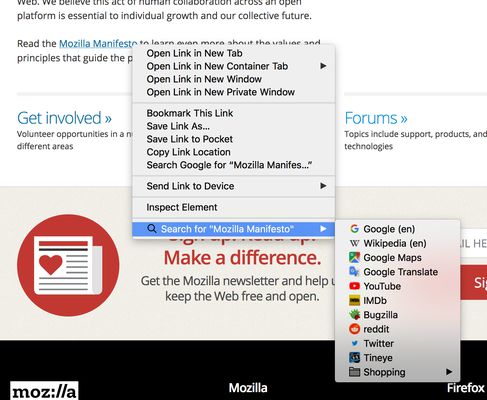
Search from the context menu! Right click on some selected text, a link text, or an image – search for it on the engines of your choice. Manage your search engines easily with the native Firefox bookmarks manager.
۶۷۸ کاربر۶۷۸ کاربر
فرادادهٔ افزونه
تصاویر صفحه
دربارهٔ این افزونه
Search from the context menu! Right click on some selected text, a link text, or an image, and perform a search for it on the engines of your choice (link text and image searches require Firefox 60 or later). Manage your search engines easily with the native Firefox bookmarks manager.
How to use
- Right click some selected text, a link, or an image on a web page.
- Select the preferred search engine under "Search for...".
Manage your search engines
- Make a folder anywhere in your bookmarks called "Searches" (you only need to do this step once).
- In Firefox version 140 and above: create a bookmark of a search result in that folder, e.g. https://www.example.com/search/?q=ZZZZZZ.
- Edit the bookmark: replace the query part of the URL with %s (lowercase), https://www.example.com/search/?q=%s, and choose a Keyword.
- In Firefox up to version 140: Add search engines by right clicking the search field on any website. In the context menu choose "Add a Keyword for this Search...", enter a keyword and click "Save" (make sure to save them in "Searches").
Questions or problems?
- Explanation of required permissions
- FAQ
- Please file bugs in the issue tracker
How to use
- Right click some selected text, a link, or an image on a web page.
- Select the preferred search engine under "Search for...".
Manage your search engines
- Make a folder anywhere in your bookmarks called "Searches" (you only need to do this step once).
- In Firefox version 140 and above: create a bookmark of a search result in that folder, e.g. https://www.example.com/search/?q=ZZZZZZ.
- Edit the bookmark: replace the query part of the URL with %s (lowercase), https://www.example.com/search/?q=%s, and choose a Keyword.
- In Firefox up to version 140: Add search engines by right clicking the search field on any website. In the context menu choose "Add a Keyword for this Search...", enter a keyword and click "Save" (make sure to save them in "Searches").
Questions or problems?
- Explanation of required permissions
- FAQ
- Please file bugs in the issue tracker
امتیاز ۴٫۳ توسط ۱۱۳ بررسیکننده
دسترسیها و دادهها
دسترسیهای الزامی:
- خواندن و تغییر نشانکها
- دسترسی به زبانههای مرورگر
- دسترسی به دادههای شما در همهٔ وبسایتها
اطلاعات بیشتر
- پیوندهای افزونه
- نسخه
- 2.8.2
- اندازه
- ۴۰٫۹۷ کیلوبایت
- آخرین بهروزرسانی
- ۹ ماه پیش (۳ ژانویه ۲۰۲۶)
- دستهبندیهای مرتبط
- خطمشی رازداری
- خطمشی رازداری این افزونه را مطالعه کنید
- تاریخچهٔ نسخهها
- افزودن به مجموعه