
Classical Search Bar 田生 توسط
Simulate classical search bar by adding a search engine switch button. And you may customize your “default” search engine easily.
۳۲۶ کاربر۳۲۶ کاربر
فرادادهٔ افزونه
تصاویر صفحه

دربارهٔ این افزونه
Due to the limitation of Firefox, web extensions may not read your search engine list nor chose default search engine for you. This extension act as a search engine, and redirect your searching to the real search engine you have chosen.
Searching with this extension would be broken as expected if you disabled this extension in private windows.
Installation
After installation, you need the following actions to make this extension work:
Permission Requested
You may be alerted that this extension require permission of access your data on some .invalid domain when you try to install it. The domain is used as the fake search engine extension used. Since no one may own a .invalid domain (which is literally invalid), you would not own any data on this site. And you should not worry about this permission.
This extension requires permissions for manage themes and extensions. They are only been used to read your enabled theme, so that this extension could have a correct themed popup.
This extension also requires context menu permission. You may enable context menu in its options.
No other special permission was required by this extension.
Keyboard Shortcuts
Use Ctrl+Shift+Up / Ctrl+Shift+Down to switch search engines from keyboard
Use Ctrl+, to open the extension panel. You can use arrow keys and enter, or, 1 ~ 9 to switch search engines.
Work with other extensions
If you want another extensions perform searching with the engine chosen in this extension. You may config " https://6905b838-e843-4ee3-9df0-b4c79673b21c.invalid/search?searchTerms={searchTerms} " as search engine in that extension.
Privacy
We collect nothing.
Limitations
Help us translate
Want this extension in your language? Create a PR on its GitHub!
https://github.com/tiansh/classical-search-bar
Currently available in:
Contributors
Some function newly added may using machine translation. File an issue on GitHub if the translation is broken...
Searching with this extension would be broken as expected if you disabled this extension in private windows.
Installation
After installation, you need the following actions to make this extension work:
- config this extension as the default search engine in Firefox options;
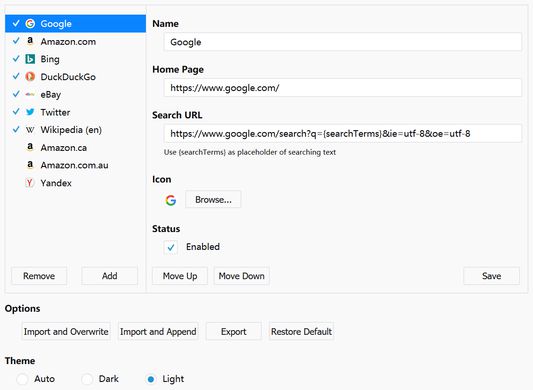
- open add-on option page, edit the search engine list to meet your requirements;
- customize your firefox ui, move the "Search By..." button to a better place (on the left side of search bar is suggested).
Permission Requested
You may be alerted that this extension require permission of access your data on some .invalid domain when you try to install it. The domain is used as the fake search engine extension used. Since no one may own a .invalid domain (which is literally invalid), you would not own any data on this site. And you should not worry about this permission.
This extension requires permissions for manage themes and extensions. They are only been used to read your enabled theme, so that this extension could have a correct themed popup.
This extension also requires context menu permission. You may enable context menu in its options.
No other special permission was required by this extension.
Keyboard Shortcuts
Use Ctrl+Shift+Up / Ctrl+Shift+Down to switch search engines from keyboard
Use Ctrl+, to open the extension panel. You can use arrow keys and enter, or, 1 ~ 9 to switch search engines.
Work with other extensions
If you want another extensions perform searching with the engine chosen in this extension. You may config " https://6905b838-e843-4ee3-9df0-b4c79673b21c.invalid/search?searchTerms={searchTerms} " as search engine in that extension.
Privacy
We collect nothing.
Limitations
- Searching use POST method is supported by a internal page. A blank page may shown first before the actual page is requested. This is due to the limitation of implementation. If you want config a search provider using POST method, please follow this guide.
- No searching suggestions may be shown. The web request of getting searching suggestions just cannot be modified by web extensions.
Help us translate
Want this extension in your language? Create a PR on its GitHub!
https://github.com/tiansh/classical-search-bar
Currently available in:
- English
- 中文 (简体)
- Русский
- Español
Contributors
- Spanish (Spain) translation: ElektroStudios
- Russian translation: Neytrino-OnLine
Some function newly added may using machine translation. File an issue on GitHub if the translation is broken...
امتیاز ۳٫۹ توسط ۲۹ بررسیکننده
دسترسیها و دادهها
دسترسیهای الزامی:
- نظارت بر استفاده از افزونه و مدیریت پوستهها
- دسترسی به دادههای شما برای 6905b838-e843-4ee3-9df0-b4c79673b21c.invalid
اطلاعات بیشتر
- پیوندهای افزونه
- نسخه
- 2.2.0
- اندازه
- ۱۶۵٫۱۹ کیلوبایت
- آخرین بهروزرسانی
- ۵ سال پیش (۸ مه ۲۰۲۱)
- دستهبندیهای مرتبط
- تاریخچهٔ نسخهها
- افزودن به مجموعه