
BookmarksDropDown PaulJayD توسط
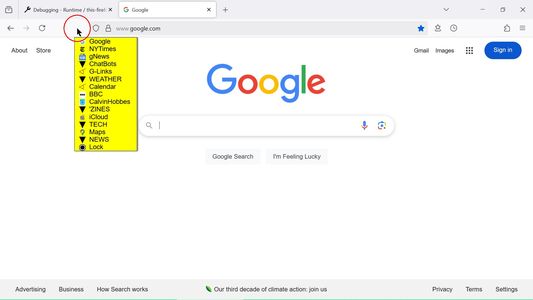
Causes a clickable menu of current Bookmarks Toolbar items to appear when the mouse pointer is above the Firefox viewport (the area which displays web content).
۴۵ کاربر۴۵ کاربر
فرادادهٔ افزونه
تصاویر صفحه
دربارهٔ این افزونه
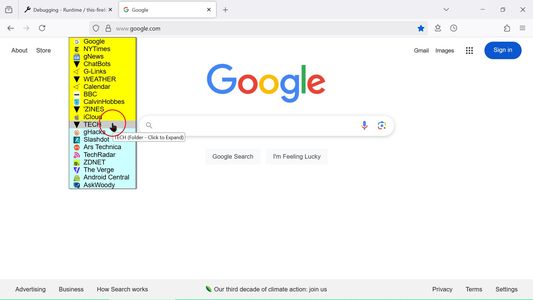
The BookmarksDropDown Firefox Extension causes a customized Bookmarks Menu (based on the contents of the Bookmarks Toolbar menu) to appear when the mouse pointer is above the Firefox viewport (the area which displays web content).
Moving the cursor back over web content, or clicking one of the Bookmarks, then causes the Bookmarks Menu to disappear.
When the Bookmarks Menu is showing, you can use the normal mouse-click operations to select and open a bookmark in the current tab (left-click), a new tab (middle-click), or
open a menu of possible actions (right-click).
Additionally:
1. Middle-Click or Ctrl-Click on a Bookmark opens it in a new tab and keeps the bookmarks menu showing.
2. Middle-Click or Ctrl-Click on a Folder loads all the folder's bookmarks, each in a new tab. Duplicate tabs will not be created.
Options:
Options are available to display Bookmark website "favicons" (or not), and customize the menu text style, size, and colors (backgrounds, and highlight), which can improve readability for various themes.
Also, you can specify whether the displayed bookmarks are clipped or not, and how long the menu remains visible after the cursor moves away.
For Folders containing multiple bookmarks:
* Option "Folder Load Count" causes loading the website content for the first specified number of bookmarks into new tabs, while only creating tabs for each of the remaining bookmarks (without loading their content).
* Option "Folder Open First" specifies loading and opening (showing) the first bookmark in the folder.
* The "Folder Sort Bookmarks" option specifies that when clicked, a Folder's Bookmarks will be displayed in alphabetic sort-order.
Notes:
* You must turn off the regular Bookmarks Toolbar (right-click on Tabbar, uncheck).
* Web Extension add-ons do not work in certain pages (newtab, about:, mozilla, for example).
Moving the cursor back over web content, or clicking one of the Bookmarks, then causes the Bookmarks Menu to disappear.
When the Bookmarks Menu is showing, you can use the normal mouse-click operations to select and open a bookmark in the current tab (left-click), a new tab (middle-click), or
open a menu of possible actions (right-click).
Additionally:
1. Middle-Click or Ctrl-Click on a Bookmark opens it in a new tab and keeps the bookmarks menu showing.
2. Middle-Click or Ctrl-Click on a Folder loads all the folder's bookmarks, each in a new tab. Duplicate tabs will not be created.
Options:
Options are available to display Bookmark website "favicons" (or not), and customize the menu text style, size, and colors (backgrounds, and highlight), which can improve readability for various themes.
Also, you can specify whether the displayed bookmarks are clipped or not, and how long the menu remains visible after the cursor moves away.
For Folders containing multiple bookmarks:
* Option "Folder Load Count" causes loading the website content for the first specified number of bookmarks into new tabs, while only creating tabs for each of the remaining bookmarks (without loading their content).
* Option "Folder Open First" specifies loading and opening (showing) the first bookmark in the folder.
* The "Folder Sort Bookmarks" option specifies that when clicked, a Folder's Bookmarks will be displayed in alphabetic sort-order.
Notes:
* You must turn off the regular Bookmarks Toolbar (right-click on Tabbar, uncheck).
* Web Extension add-ons do not work in certain pages (newtab, about:, mozilla, for example).
- Restores original "Menu Hide Delay" action
- Changes "Menu Time-To-Live" default to "0" (inactive)
امتیاز ۳٫۶ توسط ۲۹ بررسیکننده
دسترسیها و دادهها
دسترسیهای الزامی:
- خواندن و تغییر نشانکها
- دسترسی به زبانههای مرورگر
- دسترسی به دادههای شما در همهٔ وبسایتها
اطلاعات بیشتر
- پیوندهای افزونه
- نسخه
- 3.2.4
- اندازه
- ۳۲٫۶۲ کیلوبایت
- آخرین بهروزرسانی
- ۷ ماه پیش (۵ مارس ۲۰۲۶)
- دستهبندیهای مرتبط
- تاریخچهٔ نسخهها
- افزودن به مجموعه