Auto Save HTML nunoarruda توسط
Auto Save HTML is a small extension which can be used to automatically download the HTML document(s) of a specified website when browsing that same website.
۲۴۳ کاربر۲۴۳ کاربر
فرادادهٔ افزونه
تصاویر صفحه
دربارهٔ این افزونه
HOW TO USE
1. Install the extension
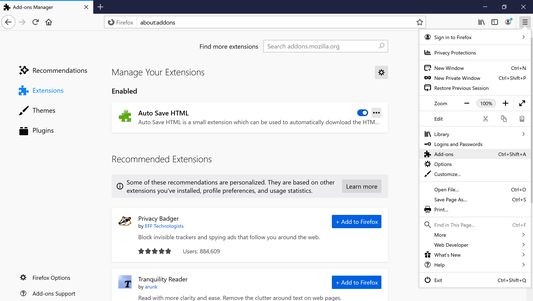
2. Click on menu (3-stripes) button -> Add-ons -> Extensions
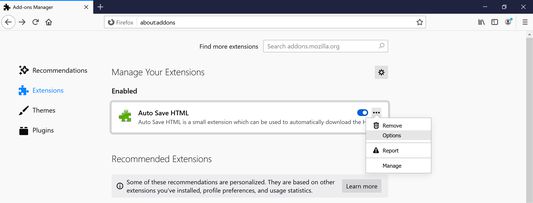
3. Click the ellipsis (3-dot) menu and then Options (Windows) or Preferences (macOS/Linux)
4. Add target sites (use a match pattern)
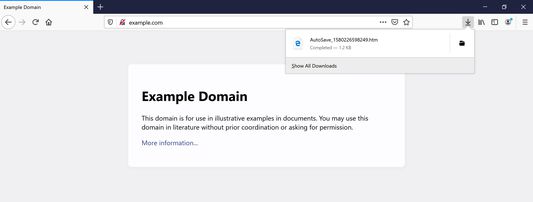
5. Navigate to the target sites. The extension will dump HTML files from a target site into the browser's Downloads folder as AutoSave_{TIMESTAMP}.htm
This extension is inspired by Auto Save Document and the development motivated by the Auto Save Document's non-compatibility with Firefox Quantum.
1. Install the extension
2. Click on menu (3-stripes) button -> Add-ons -> Extensions
3. Click the ellipsis (3-dot) menu and then Options (Windows) or Preferences (macOS/Linux)
4. Add target sites (use a match pattern)
5. Navigate to the target sites. The extension will dump HTML files from a target site into the browser's Downloads folder as AutoSave_{TIMESTAMP}.htm
This extension is inspired by Auto Save Document and the development motivated by the Auto Save Document's non-compatibility with Firefox Quantum.
امتیاز ۴٫۱ توسط ۹ بررسیکننده
دسترسیها و دادهها
دسترسیهای الزامی:
- بارگیری پروندهها و خواندن و ویرایش تاریخچهٔ دانلود مرورگر
- دسترسی به دادههای شما در همهٔ وبسایتها
اطلاعات بیشتر
- پیوندهای افزونه
- نسخه
- 2.0.3
- اندازه
- ۱۲٫۴۵ کیلوبایت
- آخرین بهروزرسانی
- ۷ سال پیش (۱۶ مارس ۲۰۲۰)
- مجوز
- مجوز MIT
- تاریخچهٔ نسخهها
- افزودن به مجموعه
توسعه دهنده این افزونه از شما درخواست میکند که به ادامه یافتن توسعهی آن با یک مشارکت کوچک کمک کنید.