Buscador de complementos para Firefox
  • Extensiones
  • Temas
    • para Firefox
    • Diccionarios y paquetes de idiomas
    • Otros sitios de navegadores
    • Complementos para Android
Conectarse
Vista previa de REtoUN

REtoUN por DBSH

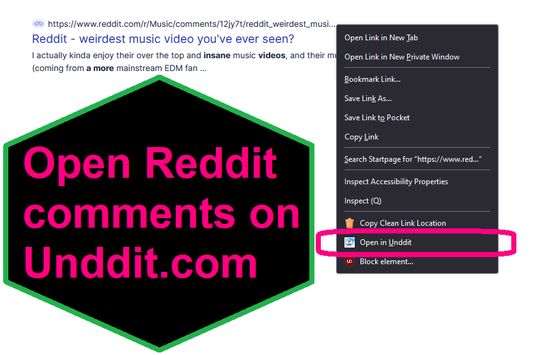
EXTENSION IS DEPRECATED - SEE ABOUT THIS EXTENSION BELOW FOR MORE DETAIL A simple extension that adds an option to the context menu to open links to Reddit comments on unddit.com instead, in a new tab.

0 (0 revisiones)0 (0 revisiones)
2 usuarios2 usuarios
Descarga Firefox y obtiene la extensión
Descargar archivo

Metadata de la extensión

Capturas de pantalla
Sobre esta extensión
EXTENSION IS DEPRECATED. NOTES: https://www.unddit.com is gone, and its existence was necessary for this extension to function. I am leaving this extension published for educational purposes (someone may want to use the source for a similar use case where an option in the context menu links to a re-written URL)

This is for those who prefer to read Reddit comments on https://www.unddit.com - maybe you prefer to see deleted comments, or maybe you think "continue this thread" is a crime against UI.
To use, right-click on a link to a Reddit post, and choose Open in Unddit from the context menu. If the link to the Reddit post is https://www.reddit.com/r/news/comments/130kndv for example, using REtoUN will open https://www.unddit.com/r/news/comments/130kndv instead, in a new tab.
Comentarios del desarrollador
Note that in Firefox, content on https://www.unddit.com requires turning off Enhanced Tracking Protection to load. This behavior is not at all related to this extension.

Developer is not affiliated with Unddit.com, but is a huge fan of the project.

To view this extension's source code:
1. In a Firefox instance that already has this extension installed, type about:profiles in the Firefox address bar, then press Enter
2. Under the profile labeled This is the profile in use and it cannot be deleted, click on the Open Directory button (appears as Open Folder on Windows) next to Root Directory
3. In the file explorer window that opens, go into the extensions directory (the extensions folder)
4. Copy the file {d40ec1bd-9875-4dbd-a1f7-cba6e2d9d281}.xpi and paste it somewhere else, such as your Desktop
5. Rename the file you just pasted, changing the extension to .zip - so {d40ec1bd-9875-4dbd-a1f7-cba6e2d9d281}.xpi becomes {d40ec1bd-9875-4dbd-a1f7-cba6e2d9d281}.zip
6. Unzip the file {d40ec1bd-9875-4dbd-a1f7-cba6e2d9d281}.zip. The extracted files are the source, especially the .json and .js files.
Calificado 0 por 0 revisores
Inicia sesión para evaluar esta extensión
Todavía no hay valoraciones

Se guardó la valoración

5
0
4
0
3
0
2
0
1
0
Aún no hay revisiones
Permisos y datos

Permisos requeridos:

  • Acceder a las pestañas del navegador
Saber más
Más información
Versión
1.0
Tamaño
26,31 KB
Última actualización
hace 3 años (27 de abr. de 2023)
Categorías relacionadas
  • Canales, noticias y blogs
  • Privacidad y seguridad
  • Social y comunicación
Licencia
Solo Licencia Pública General de GNU v3.0
Política de privacidad
Leer la política de privacidad de este complemento
Historial de versiones
  • Ver todas las versiones
Añadir a la colección
Reportar este complemento
Ir a la página de inicio de Mozilla

Complementos

  • Acerca de
  • Blog de complementos de Firefox
  • Taller de extensiones
  • Central del desarrollador
  • Normativas para desarrolladores
  • Blog de la comunidad
  • Foro
  • Informar de un error
  • Guía de revisión

Navegadores

  • Desktop
  • Mobile
  • Enterprise

Productos

  • Browsers
  • VPN
  • Relay
  • Monitor
  • Pocket
  • Bluesky (@firefox.com)
  • Instagram (Firefox)
  • YouTube (firefoxchannel)
  • Privacidad
  • Cookies
  • Legal

A menos que se indique lo contrario, el contenido de este sitio está licenciado bajo la licencia Creative Commons Reconocimiento Compartir-Igual v3.0 o una versión posterior.