De-Troll YouTube - Hide Unwanted Commenters por jscher2000
Easily hide comments from a troll using the right-click context menu or trash can icon next to the poster's name. Not an official YouTube extension.
137 usuarios137 usuarios
Metadata de la extensión
Capturas de pantalla
Sobre esta extensión
This extension doesn't use artificial intelligence, you decide what to block. Hide "trolls" and other unwanted commenters on all YouTube watch pages.
I recently became aware of another add-on that has this feature AND many more. I haven't tried it myself, but feel free to take a look: BlockTube.
Button option (version 0.6)
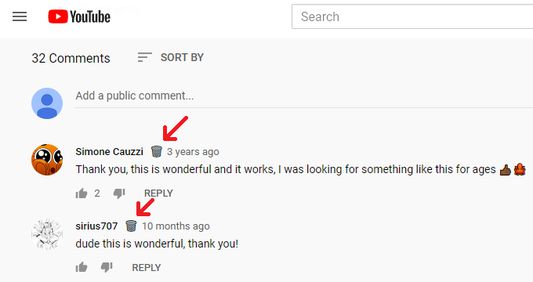
Click the trash can to add that commenter to your troll list. To manage your toll list, or to turn off the trash cans, Shift+click one of the buttons to open the Options page.
Context menu option
Right-click the comment and either:
* Click "Hide Commenter's Comments" to hide all of their comments
* Shift+click "Hide Commenter's Comments" to open the Options page to manage your list
I recently became aware of another add-on that has this feature AND many more. I haven't tried it myself, but feel free to take a look: BlockTube.
Button option (version 0.6)
Click the trash can to add that commenter to your troll list. To manage your toll list, or to turn off the trash cans, Shift+click one of the buttons to open the Options page.
Context menu option
Right-click the comment and either:
* Click "Hide Commenter's Comments" to hide all of their comments
* Shift+click "Hide Commenter's Comments" to open the Options page to manage your list
Calificado 4,8 por 16 revisores
Permisos y datos
Más información
- Enlaces del complemento
- Versión
- 0.9
- Tamaño
- 22,61 KB
- Última actualización
- hace 2 años (2 de jun. de 2024)
- Categorías relacionadas
- Licencia
- Licencia pública de Mozilla 2.0
- Historial de versiones
- Añadir a la colección