PassEye | Revealing passwords von Sineway
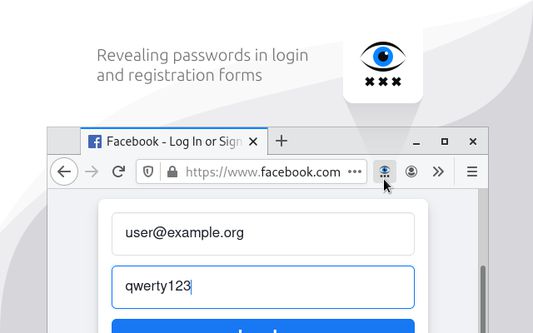
Revealing passwords in login and registration forms
86 Benutzer86 Benutzer
Metadaten zur Erweiterung
Screenshots
Über diese Erweiterung
§ 1. How to use
- Click the toolbar icon
- Or use keyboard shortcut «Alt+Shift+R»
- Or open the context menu by hovering over the password field and select «Reveal password»
§ 2. How it works
When you run the extension, it finds all the standard <input type=password> elements on the page and changes the value of the type attribute.
§ 3. Limitations
- Special pages where extensions cannot work.
- Form in <iframe> from another website (cross-site security policy).
- Password field implemented without <input type=password> element.
- Click the toolbar icon
- Or use keyboard shortcut «Alt+Shift+R»
- Or open the context menu by hovering over the password field and select «Reveal password»
§ 2. How it works
When you run the extension, it finds all the standard <input type=password> elements on the page and changes the value of the type attribute.
§ 3. Limitations
- Special pages where extensions cannot work.
- Form in <iframe> from another website (cross-site security policy).
- Password field implemented without <input type=password> element.
Bewertet mit 5 von 7 Bewertern
Weitere Informationen
- Add-on-Links
- Version
- 3.2.0
- Größe
- 29,8 KB
- Zuletzt aktualisiert
- vor 4 Jahren (12. Apr. 2022)
- Verwandte Kategorien
- Lizenz
- Alle Rechte vorbehalten
- Versionsgeschichte
- Zur Sammlung hinzufügen